
Lewati ke konten
WordPress.org

Indonesia

  • Tema
  • Plugin
  • Berita
  • Bantuan
  • Tentang
  • Komunitas
  • Poliglot
  • Gunakan WordPress
Gunakan WordPress
WordPress.org

Plugin Directory

ShareMe Social Share Plugin Blog & WooCommerce Products

  • Kirim plugin
  • Favorit saya
  • Login
  • Kirim plugin
  • Favorit saya
  • Login

ShareMe Social Share Plugin Blog & WooCommerce Products

Oleh Shipon Karmakar
Unduh
  • Detail
  • Ulasan
  • Instalasi
  • Pengembangan
Bantuan

Deskripsi

ShareMe adds fast, customizable social share buttons to posts, pages, and WooCommerce products — with a modern admin, drag-and-drop network ordering, and no external scripts.

Features

  • 13 built-in networks: Facebook, X (Twitter), LinkedIn, Pinterest, WhatsApp, Telegram, Reddit, Tumblr, Messenger, Pocket, Email, Copy Link, Print
  • Drag-and-drop sortable network list — enable, disable, and reorder in the admin
  • Per-network color pickers, custom icon (foreground) color
  • Button style: circle, rounded, or square — small / medium / large — optional labels
  • Custom heading text, position (before / after / both), or a sticky vertical sidebar (left or right)
  • Open share dialogs in a centered popup window
  • WooCommerce single-product share slot (woocommerce_share) supported out of the box
  • Gutenberg block (“ShareMe Buttons”) with live editor preview via server-side render
  • Elementor widget (“ShareMe Buttons”) with matching controls
  • Shortcode [shareme_buttons] with attributes for per-placement overrides
  • Shortcode Builder in the admin with a savable shortcode library
  • No external scripts, inline SVG icons for crisp rendering
  • Translation-ready (shareme text domain)

Shortcode

[shareme_buttons networks="facebook,twitter,whatsapp" shape="rounded" size="large" labels="yes" heading="Spread the word"]

Support

For support and feature requests, visit Shipon Karmakar’s Website or the WordPress.org Plugin Page.

Tangkapan Layar
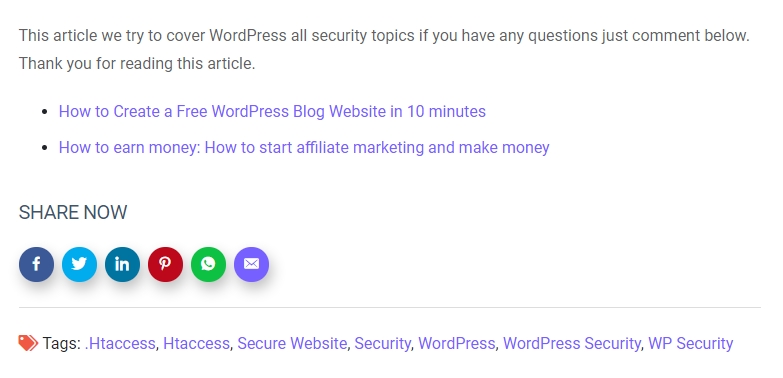
Social sharing buttons in action on a blog post.

Blok

Plugin ini menyediakan 1 blok.

  • ShareMe Buttons

Instalasi

  1. Upload the shareme folder to /wp-content/plugins/ (or install from the WordPress plugin directory).
  2. Activate the plugin through the Plugins menu.
  3. Configure under Settings → ShareMe.
  4. Optional: drop the ShareMe Buttons block into any post, or drag the ShareMe Buttons widget in Elementor.

Tanya Jawab

Where do the share buttons appear?

By default on single posts and WooCommerce product pages. Toggle pages, sticky sidebar, and position in Settings → ShareMe → Display.

Can I change the button colors?

Yes — the Networks tab has a color picker per network, and the Style tab has a global icon color.

Does this plugin load external scripts?

No. Icons are inline SVG and the small share/copy/print helper script is served from your site.

Does it work with WooCommerce?

Yes. When WooCommerce is active and “WooCommerce products” is enabled, buttons render in the product’s share slot.

Does it support Gutenberg and Elementor?

Yes — both are registered automatically when Gutenberg / Elementor is present.

Ulasan

Excellent Social Sharing Plugins

Muhibul Haque 25 Agustus 2023
Share Me is an exceptional WordPress plugin for social sharing. Its intuitive design and seamless integration make it a must-have for website owners looking to boost their online presence. With a wide array of customizable social sharing buttons, Share Me allows you to effortlessly encourage your visitors to share your content with their networks.

A Best Share Plugin easy to use

farhadsoft 11 Juni 2022
The Best Share Plugin easy to use, i just install this plugin and automatic show all social icon on blog post

It’s so easy to use.

williamwp 18 Oktober 2020
It’s so easy to use. I just install and automatic add social icon on my all posts
Baca semua 3 ulasan

Kontributor & Pengembang

“ShareMe Social Share Plugin Blog & WooCommerce Products” adalah perangkat lunak open source. Berikut ini mereka yang sudah berkontribusi pada plugin ini.

Kontributor
  • Shipon Karmakar

“ShareMe Social Share Plugin Blog & WooCommerce Products” telah diterjemahkan dalam 1 bahasa. Terima kasih kepada para penerjemah untuk kontribusi-nya.

Terjemahkan “ShareMe Social Share Plugin Blog & WooCommerce Products” dalam bahasa Anda.

Tertarik mengembangkan?

Lihat kode, periksa repositori SVN , atau mendaftar ke log pengembangan melalui RSS.

Log Perubahan

2.1.0

  • Tested with WordPress 7.1.
  • WooCommerce support via woocommerce_share.
  • New networks: Telegram, Reddit, Tumblr, Messenger, Pocket, Copy Link, Print (13 total).
  • Drag-and-drop sortable network list with enable toggles.
  • Per-network color pickers and a global icon color.
  • Button shape (circle / rounded / square) and size (small / medium / large), optional labels.
  • Custom heading text, position (before / after / both), and sticky sidebar (left / right).
  • Open share dialogs in a centered popup window.
  • Tabbed admin UI (General / Networks / Display / Style / Shortcode Builder) with a savable shortcode library.
  • Gutenberg block “ShareMe Buttons” (dynamic, server-rendered, with Inspector controls).
  • Elementor widget with matching controls in a dedicated “ShareMe” category.
  • Inline SVG icons; front-end helper script for popup, copy-link (with toast), and print.
  • Fixed URL-encoding / XSS issue in share URLs; added a proper settings sanitizer.
  • Guarded the_content filter against widgets, excerpts, and feeds.
  • New shortcode [shareme_buttons] with attribute overrides (old [show_shareme_social_buttons] still works).

2.0.0

  • Settings page for per-network toggles and master enable.

1.3.0

  • Improved compatibility with WordPress 6.4.
  • Enhanced security with better input validation.
  • Fixed minor CSS issues.

1.2.0

  • Added WhatsApp sharing support.
  • Optimized performance by removing unnecessary scripts.

1.1.0

  • Added LinkedIn and Pinterest sharing options.
  • Improved mobile responsiveness.

1.0.0

  • Initial release with Facebook and Twitter support.

Meta

  • Versi 2.1.0
  • Diperbarui 2 bulan yang lalu
  • Instalasi Aktif 20+
  • Versi WordPress 5.6 atau yang terbaru
  • Diuji hingga 7.1.3
  • Versi PHP 7.2 atau yang terbaru
  • Bahasa

    Bengali (Bangladesh) dan English (US).

    Terjemahkan dalam bahasa Anda

  • Tag
    Gutenberg blockshare buttonssocial mediasocial sharewoocommerce share
  • Tampilan lanjut

Rating

5 dari 5 bintang.
  • 3 ulasan 5-bintang 5 bintang 3
  • 0 ulasan 4-bintang 4 bintang 0
  • 0 ulasan 3-bintang 3 bintang 0
  • 0 ulasan 2-bintang 2 bintang 0
  • 0 ulasan 1-bintang 1 bintang 0

Your review

Lihat semua ulasan

Kontributor

  • Shipon Karmakar

Bantuan

Ada yang ingin dikatakan? Butuh bantuan?

Lihat forum bantuan

  • Tentang
  • Berita
  • Hosting
  • Privasi
  • Tampilan
  • Tema
  • Plugin
  • Pola
  • Belajar
  • Bantuan
  • Developer
  • WordPress.tv ↗
  • Terlibat
  • Kegiatan
  • Donasi ↗
  • Swag ↗
  • WordPress.com ↗
  • Matt ↗
  • bbPress ↗
  • BuddyPress ↗
WordPress.org

Indonesia

The WordPress® trademark is the intellectual property of the WordPress Foundation.

  • Kunjungi akun X (sebelumnya Twitter) kami
  • Visit our Bluesky account
  • Kunjungi akun Mastodon kami
  • Visit our Threads account
  • Kunjungi halaman Facebook kami
  • Kunjungi akun Instagram kami
  • Kunjungi akun LinkedIn kami
  • Visit our TikTok account
  • Kunjungi channel YouTube kami
  • Visit our Tumblr account
Kode adalah Puisi.