

Deskripsi
MDL Local Geo Lookup is a lightweight WordPress geolocation plugin that detects visitor location using a local IP geolocation database — no external API calls, no per-request latency, no usage limits.
The plugin automatically downloads and maintains an IP-to-city database on your own server. Every GeoIP lookup runs locally, keeping your site fast and your visitor data private.
No sign-up required. The default DB-IP City Lite source works out of the box — no account, no license key, no configuration. Activate, click one button, done.
Prefer MaxMind?
Switch to GeoLite2 City in Settings by entering a free MaxMind license key.
Why Local Geolocation?
Most IP geolocation plugins call an external API on every page load. That adds latency, creates a single point of failure, and sends your visitor IPs to a third party. MDL Local Geo Lookup keeps everything on your server:
- Faster — database lookups in milliseconds, no HTTP round-trip.
- More private — visitor IPs never leave your server.
- More reliable — no API rate limits, no downtime from third-party services.
- Unlimited lookups — no monthly quota, no paid API tiers.
Features:
- Two database sources — DB-IP City Lite (default, no account needed) or MaxMind GeoLite2 City (free license key required).
- One-click setup — download the geolocation database directly from your admin panel after activation.
- Automatic updates — scheduled database refresh keeps IP data current (configurable: 1–30 days).
- Shortcode —
[mdlgeo_visitor_info]displays visitor country, city, region, postal code, timezone, and coordinates on any page or post. - PHP function —
mdlgeo_get_visitor_geo_data()returns full location data for use in themes, plugins, or custom logic. - Visitor location log — optional paginated log of visitor IP addresses and detected locations in the admin panel.
- Form builder compatible — embed the shortcode in a hidden field in Elementor Forms, Contact Form 7, WPForms, Gravity Forms, or any HTML form to capture visitor location with submissions.
- Cloudflare compatible — automatically reads the real visitor IP from
CF-Connecting-IPwhen Cloudflare is active. - Source alignment tracking — detects when the installed MMDB file does not match the selected database source and prompts you to update it.
- GeoIP2 PHP reader bundled — no Composer, no external library downloads.
- Secure logging — log directory protected with
.htaccessandindex.phpto block direct web access.
Use Cases:
- Display visitor city and country on any page
- Pre-fill location fields in contact or lead-capture forms
- Personalize content based on visitor country or region
- Log visitor locations for analytics or compliance
- Feed location data into custom plugins or theme logic
Requirements:
- WordPress 5.8 or higher
- PHP 7.4 or higher
- PHP extensions:
zlib,phar - MaxMind license key only required if you select the MaxMind GeoLite2 source
External Services
This plugin connects to third-party services only to download geolocation databases. No visitor data is transmitted to these services.
DB-IP (default)
- What: Downloads the free DB-IP City Lite database (
.mmdbformat), licensed under CC BY 4.0. - When: On first-run setup (triggered by the admin) and on the configured auto-update schedule.
- URL:
https://download.db-ip.com/free/dbip-city-lite-{year}-{month}.mmdb.gz - Website: https://db-ip.com
- Terms of Use: https://db-ip.com/db/lite.php
- Privacy Policy: https://db-ip.com/privacy.php
MaxMind GeoLite2 (optional)
- What: Downloads the MaxMind GeoLite2 City database (
.mmdbformat). Only used when the admin selects MaxMind as the database source and provides a license key. - When: On source change or license key update, and on the configured auto-update schedule.
- URL:
https://download.maxmind.com/app/geoip_download?... - Website: https://www.maxmind.com
- Terms of Use: https://www.maxmind.com/en/geolite2/eula
- Privacy Policy: https://www.maxmind.com/en/privacy-policy
When using the MaxMind source, this plugin uses the GeoLite2 database created by MaxMind, available from https://www.maxmind.com.
Privacy Policy
Visitor location logging is disabled by default and must be explicitly enabled by the site admin in Settings.
When enabled, each frontend page load by a non-logged-in visitor appends one line to a local log file containing the serial number, timestamp, IP address, country, city, postal code, timezone, and coordinates. All data is stored on your server. No data is transmitted to external services.
Because log entries are associated only with IP addresses — not persistent identifiers such as email addresses — the plugin does not register with WordPress personal data export or erasure tools. You are responsible for disclosing this data collection in your site’s privacy policy in accordance with applicable law (e.g., GDPR, CCPA).
Tangkapan Layar
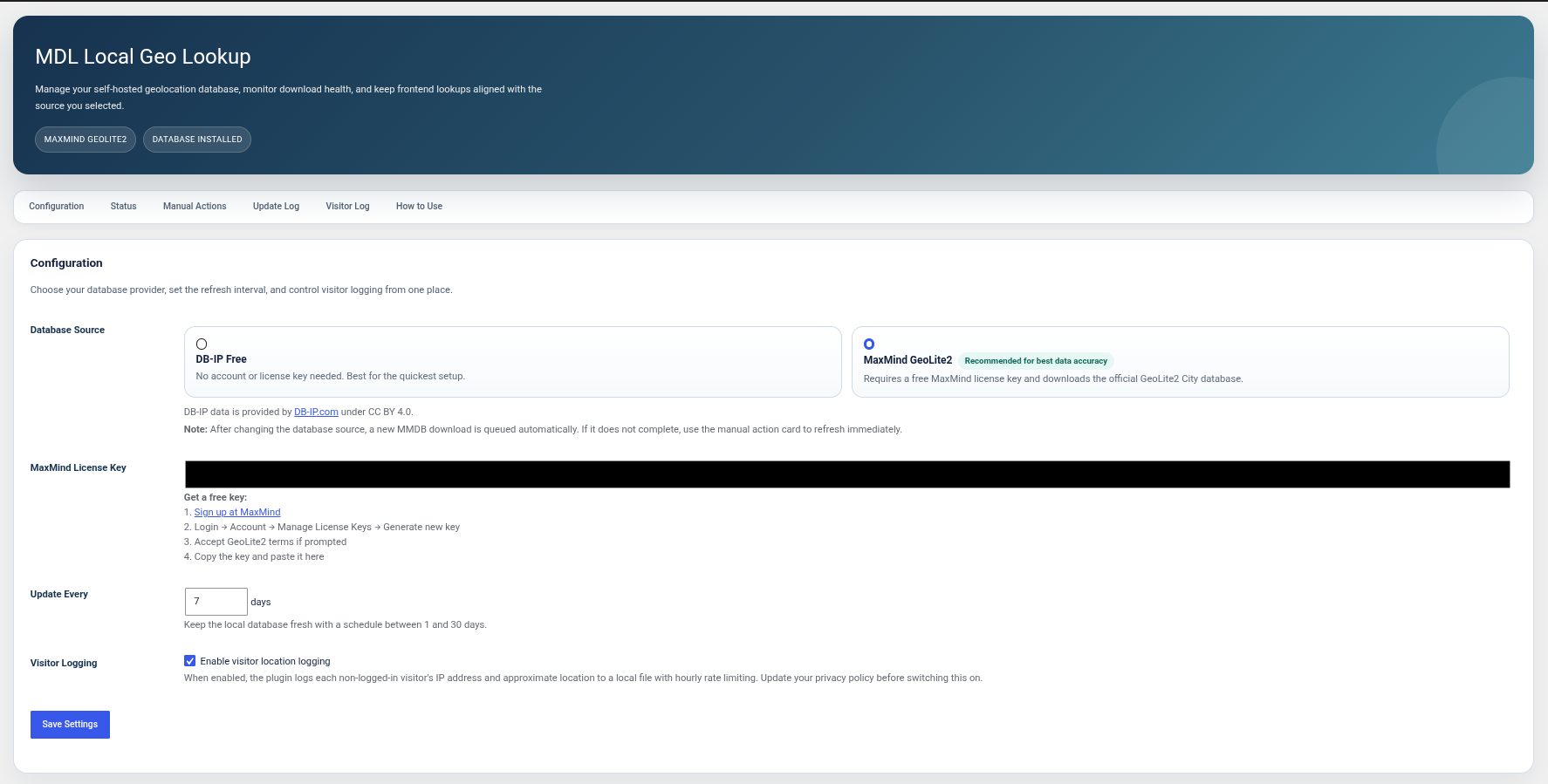
Settings page — database source, license key, update interval, source alignment status, and visitor logging toggle. 
Visitor log — paginated view of logged visitor locations. 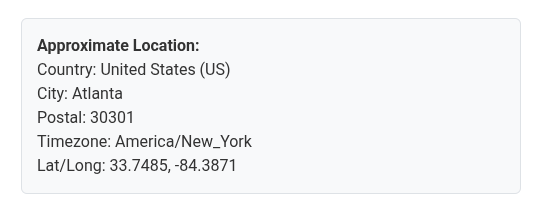
Shortcode output — [mdlgeo_visitor_info] displaying detected location data.
Instalasi
- Upload the
mdl-local-geo-lookupfolder to/wp-content/plugins/, or install directly from Plugins > Add New. - Activate the plugin via Plugins > Installed Plugins.
- Click Download Now in the admin notice to fetch the DB-IP geolocation database.
- (Optional) Go to Settings > MDL Local Geo Lookup to switch to MaxMind GeoLite2, adjust the update interval, or enable visitor logging.
Tanya Jawab
-
Can I use this without creating any account?
-
Yes. The plugin uses the free DB-IP City Lite database by default. No account, no license key, no sign-up — it works immediately after activation.
-
Where do I get a MaxMind license key?
-
- Create a free MaxMind account
- Log in and go to Account > Manage License Keys
- Generate a new license key and accept the GeoLite2 EULA if prompted
- Paste the key into Settings > MDL Local Geo Lookup
-
Where is the geolocation database stored?
-
The
.mmdbfile is stored in your WordPress uploads directory:wp-content/uploads/mdl-local-geo-lookup/. The filename depends on the selected source (DB-IP or MaxMind). The GeoIP2 PHP reader library is bundled inside the plugin folder and does not need to be downloaded separately. -
How often is the database updated?
-
By default, every 7 days. You can set any value between 1 and 30 days in the plugin settings. DB-IP publishes a new database on the first of each month. MaxMind publishes updates on the first Tuesday of each month.
-
What happens if the selected source and installed database do not match?
-
The plugin tracks which source last downloaded the installed MMDB file. If there is a mismatch, the settings page displays a warning and prompts you to run a manual database update before relying on the data.
-
Does this work behind Cloudflare?
-
Yes. When Cloudflare is in front of your site, the plugin automatically reads the real visitor IP from the
CF-Connecting-IPheader. -
Can I use this with form builders?
-
Yes. Place the
[mdlgeo_visitor_info]shortcode inside a hidden field in Elementor Forms, Contact Form 7, WPForms, Gravity Forms, or any HTML form. The visitor’s detected location is submitted along with the form data. -
What data does the visitor log record?
-
When logging is enabled, each entry contains: serial number, timestamp, IP address, country, city, postal code, timezone, and coordinates. Logging is disabled by default.
-
Is the visitor log publicly accessible?
-
No. An
.htaccessfile and anindex.phpfile are created in the logs directory on activation to block direct web access. -
Does this work on WordPress Multisite?
-
The plugin is designed for single-site installations. It can be activated per-site on a multisite network, but network-wide activation is not officially supported.
Ulasan
Belum ada ulasan untuk plugin ini.
Kontributor & Pengembang
“MDL Local Geo Lookup” adalah perangkat lunak open source. Berikut ini mereka yang sudah berkontribusi pada plugin ini.
Kontributor
Terjemahkan “MDL Local Geo Lookup” dalam bahasa Anda.
Tertarik mengembangkan?
Lihat kode, periksa repositori SVN , atau mendaftar ke log pengembangan melalui RSS.
Log Perubahan
1.0.0
- Initial release.