

Deskripsi
An easy way to add custom fields to your object types (post, pages, custom post types, users) & to generate option pages.
The goal of this plugin is to help you rapidly build familiar, intuitive interfaces for your users in a very WordPress-native way.
The custom field panel is nice, but not quite the easiest thing for users to work with. Adding your own metaboxes and fields involves a lot of time and repetitive code that could be better used elsewhere.
This plugin handles all that heavy-lifting for you behind-the-scenes, so that you can focus on more on building out and connecting your data rather than all the minor details. This single piece of code x_add_metadata_field( 'my-field-name', 'post' ); generates a metabox with a text field inside it, with the necessary hooks to save the entered values.
The API is similar to that used for registering custom post types and taxonomies so it should be familiar territory.
NOTE: The plugin now requires WordPress 3.3+ (chiefly for the wysiwyg & datepicker fields)
Like what you see? Want more field types and features added? Get in touch or contribute on github
See “Other Notes” section for usage information
Usage
Object Types
The main idea behind this plugin is to have a single API to work with regardless of the object type. Currently, Custom Metadata Manager works with user, comment and any built-in or custom post types, e.g. post, page, etc.
Registering your fields
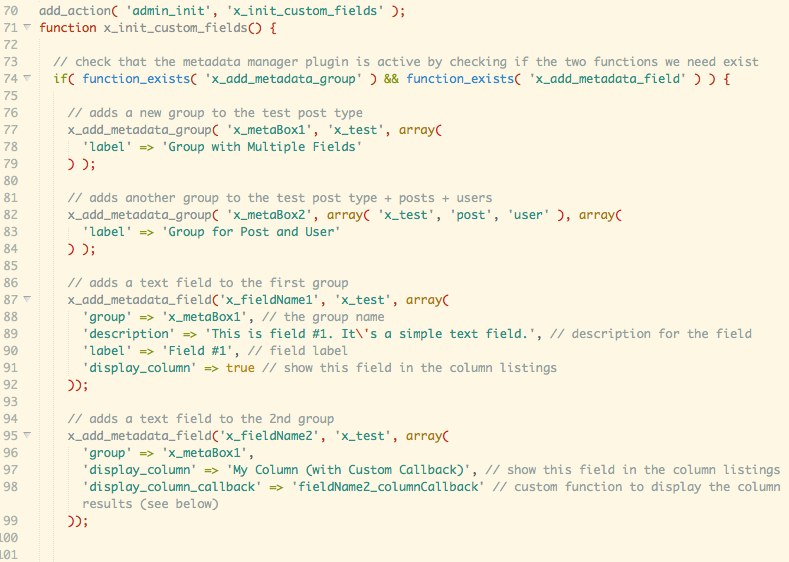
For the sake of performance (and to avoid potential race conditions), always register your custom fields in the admin_menu hook. This way your front-end doesn’t get bogged down with unnecessary processing and you can be sure that your fields will be registered safely. Here’s a code sample:
add_action( 'admin_menu', 'my_theme_init_custom_fields' );

function my_theme_init_custom_fields() {
    if( function_exists( 'x_add_metadata_field' ) && function_exists( 'x_add_metadata_group' ) ) {
        x_add_metadata_field( 'my_field', array( 'user', 'post' ) );
    }
}
Getting the data
You can get the data as you normally would using the get_metadata function. Custom Metadata manager stores all data using the WordPress metadata APIs using the slug name you provide. That way, even if you decide to deactivate this wonderful plugin, your data is safe and accessible. For options, you can use get_option.
Example:
$value = get_metadata( 'post', get_the_ID(), 'featured', true ); // Returns post metadata value for the field 'featured'
Adding Metadata Groups
A group is essentially a metabox that groups together multiple fields. Register the group before any fields
x_add_metadata_group( $slug, $object_types, $args );
Parameters
$slug(string) The key under which the metadata will be stored.$object_types(string|array) The object types to which this field should be added. Supported: post, page, any custom post type, user, comment.
Options and Overrides
$args = array(
    'label' => $group_slug, // Label for the group
    'context' => 'normal', // (post only)
    'priority' => 'default', // (post only)
    'autosave' => false, // (post only) Should the group be saved in autosave? NOT IMPLEMENTED YET!
    'exclude' => '', // see below for details
    'include' => '', // see below for details
);
Adding Metadata Fields
x_add_metadata_field( $slug, $object_types, $args );
Parameters
$slug(string) The key under which the metadata will be stored. For post_types, prefix the slug with an underscore (e.g._hidden) to hide it from the the Custom Fields box.$object_types(string|array) The object types to which this field should be added. Supported: post, page, any custom post type, user, comment.
Options and Overrides
$args = array(
    'group' => '', // The slug of group the field should be added to. This needs to be registered with x_add_metadata_group first.
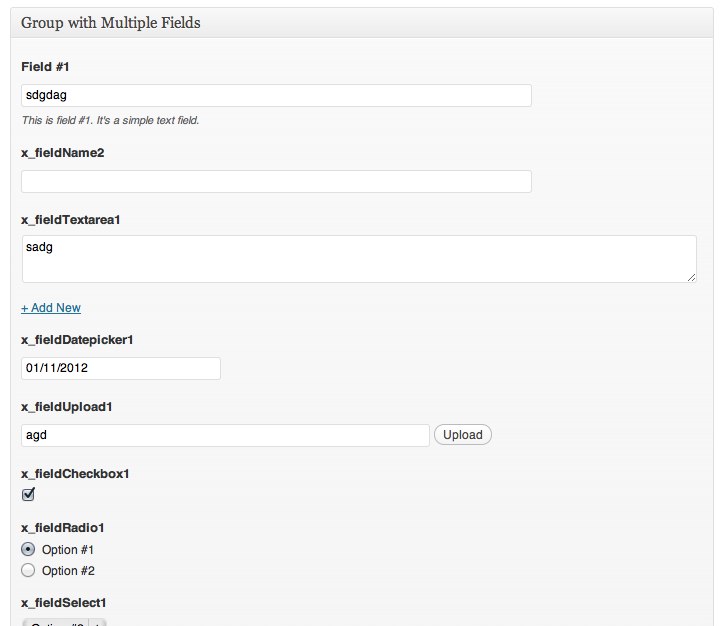
    'field_type' => 'text', // The type of field; 'text', 'textarea', 'password', 'checkbox', 'radio', 'select', 'upload', 'wysiwyg', 'datepicker', 'taxonomy_select', 'taxonomy_radio'
    'label' => '', // Label for the field
    'description' => '', // Description of the field, displayed below the input
    'values' => array(), // Values for select and radio buttons. Associative array
    'display_callback' => '', // Callback to custom render the field
    'sanitize_callback' => '', // Callback to sanitize data before it's saved
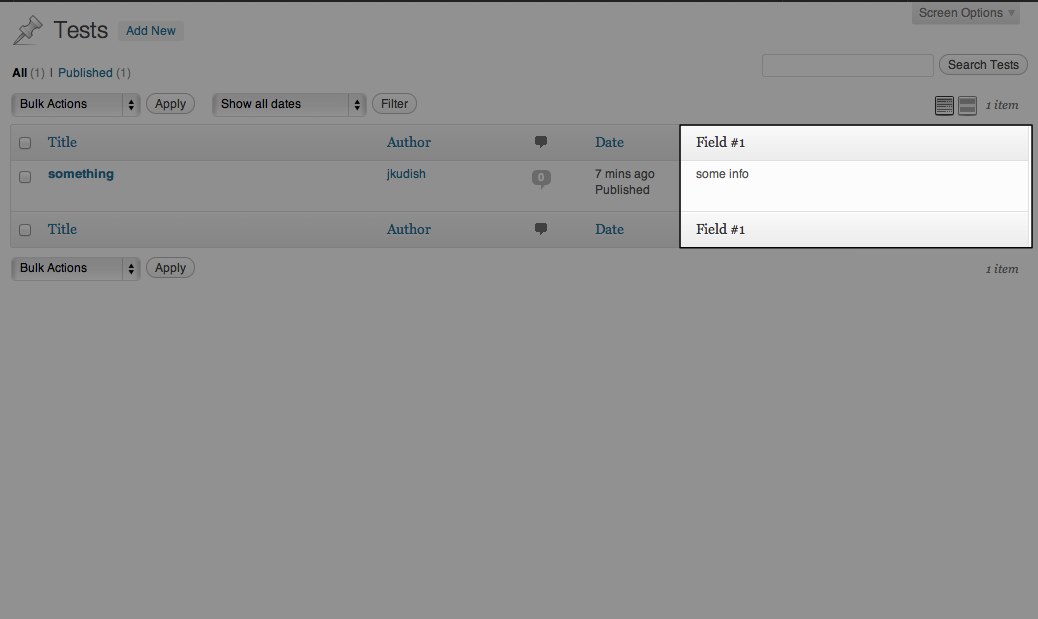
    'display_column' => false, // Add the field to the columns when viewing all posts
    'display_column_callback' => '', // Callback to render output for the custom column
    'required_cap' => '', // The cap required to view and edit the field
    'exclude' => '', // see below for details
    'include' => '', // see below for details
    'multiple' => false, // true or false, can the field be duplicated with a click of a button?
    'readonly' => false, // makes the field be readonly (works with text, textarea, password, upload and datepicker fields)
);
Include / Exclude
You can exclude fields and groups from specific object. For example, with the following, field-1 will show up for all posts except post #123:
$args = array(
    'exclude' => 123
);
x_add_metadata_field( 'field-1', 'post', $args );
Alternatively, you can limit (“include”) fields and groups to specific objects. The following will ”only” show group-1 to post #456:
$args = array(
    'include' => 123
);
x_add_metadata_group( 'group-1', 'post', $args );
You can pass in an array of IDs:
$args = array(
    'include' => array( 123, 456, 789 );
);

With multiple object types, you can pass in an associative array:
$args = array(
‘exclude’ => array(
‘post’ => 123,
‘user’ => array( 123, 456, 789 )
)
);
Examples
For examples, please see the custom_metadata_examples.php file included with the plugin. Add a constant to your wp-config.php called CUSTOM_METADATA_MANAGER_DEBUG with a value of true to see it in action:
define( 'CUSTOM_METADATA_MANAGER_DEBUG', true );
TODOs
Stuff we have planned for the future:
- Ability to clone (multiple) groups of fields
- Ability Pass in attributes for built-in fields (e.g. class, data-*, etc.)
- Additional field types (multi-select, multi-checkbox)
- Limit or exclude groups and fields using a custom callback
- Autosave support for fields on post types
- Client- and server-side validation support
- Add groups and fields to Quick Edit
Tangkapan Layar
Instalasi
- Install through the WordPress admin or upload the plugin folder to your
/wp-content/plugins/directory - Activate the plugin through the ‘Plugins’ menu in WordPress
- Add the necessary code to register your custom groups and fields to your functions.php or plugin.
- Enjoy!
Tanya Jawab
- Why a code-based approach instead of a UI?
-
Because the UI thing has been done before. And this more closely aligns with the existing WordPress approach of registering new types of content (post types, taxonomies, etc.)
This is also a developer feature, aimed towards site builders. And real developers don’t need UIs 😉
(But really, though, the main benefit of this fact comes into play when you’re working with multiple environments, i.e. development/local, qa/staging, production. This approach makes it easy to replicate UIs and features without having to worry about database synchronization and other crazy things.)
For another really well-done, really powerful code-based plugin for managing custom fields, check out Easy Custom Fields and the Custom Metaboxes and Fields For WordPress Class.
- Why isn’t the function just `add_metadata_field`? Do you really need the stupid `x_`?
-
We’re being good and “namespacing” our public functions. You should too.
Ulasan

Kontributor & Pengembang
“Custom Metadata Manager” adalah perangkat lunak open source. Berikut ini mereka yang sudah berkontribusi pada plugin ini.
Kontributor


Terjemahkan “Custom Metadata Manager” dalam bahasa Anda.
Tertarik mengembangkan?
Lihat kode, periksa repositori SVN , atau mendaftar ke log pengembangan melalui RSS.
Log Perubahan
0.7.1
- fix a bug where non-image file upload path doesn’t get inserted into the input when clicking Insert into Post from the media manager
- add ‘editor’ and ‘richtext’ as synonyms of ‘wysiwyg’ field type
0.7
- added the ability to have readonly fields with the new
readonlyparamater
0.6
- note: the plugin now requires WordPress 3.3+ (chiefly for the wysiwyg & datepicker fields)
- update/clean-up the examples file
- properly enqueue admin css for WP 3.3+
- added a filter for the CUSTOM_METADATA_MANAGER_URL constant
- fix fields not appearing when editing users in WP 3.3+ (props @FolioVision)
- now passing the
$valuefor adisplay_callback(props @FolioVision) - use the new
wp_editor()function (since WP 3.3+) instead ofthe_editor()(now deprecated) - wysiwyg fields are no longer cloneable (may be revisited in a future version)
- note: metaboxes that have a wysiwyg field will break when moved, this is not a bug per-se (may be revisited in a future version)
- password fields are now cloneable
- added filters for most of the plugin’s internal variables
- now using WordPress’ built-in jQuery UI for the datepicker field
- updated the screenshots
- updated the instructions in readme.txt
0.5.7
- pass additional params for
display_callback
0.5.6
- fix bugs with datepicker
0.5.5
- remove all whitespace
- fix some bugs with the tinymce field
0.5.4
- fix display_callback for fields
0.5.3
- removed php opening shorttags
<?in favor of regular<?phptags, which caused parse errors on some servers
0.5.2
- better tiny mce implementation and added html/visual switch
- small css fixes and added inline documentation
- moved DEFINEs in to admin_init() so that they can be filtered more easily
0.5.1
- Bug fix with group context on add meta box
- Remove few lines of old code left-over from 0.4
0.5
- Making the changes from 0.4 public
- Removed ability to generate option pages; after further consideration this is out of scope for this project
- Removed attachment_list field, useless
- Dates now save as unix timestamp
- Taxonomy fields now save as both a custom field and as their proper taxonomy (will consider adding the ability to enable/disable this in a future version)
- Multiplied fields no longer save as a serialized array, instead they save as multiple metadata with the same key (metadata api supports multiples!) – remember to set the last param to false to get multiple values.
- NOTE: currently multiplied fields will display out of order after saving, however this should not affect anything else other than the admin, should be fixed soon
- Other small improvements
0.4
- Enhanced the code which generates the different field types
- Added new types: password, upload, wysiwyg, datepicker, taxonomy_select, taxonomy_radio, attachment_list
- Added field multiplication ability
- Metadata is now deleted if a value is empty
- Can now also generate option pages which use a metabox interface
0.3
- Can now limit or exclude fields or groups from specific ids
- Added updated screenshots and new code samples!
- Bug fix: the custom display examples weren’t working well
- Bug fix: fields not showing on “Add New” page. Thanks Jan Fabry!
- Bug fix: fields not showing on “My Profile” page. Thanks Mike Tew!
0.2
- Added a textarea field type
- Added support for comments (you can now specify comments as an object type)
- Added basic styling for fields so that they look nice
0.1
- Initial release