Deskripsi
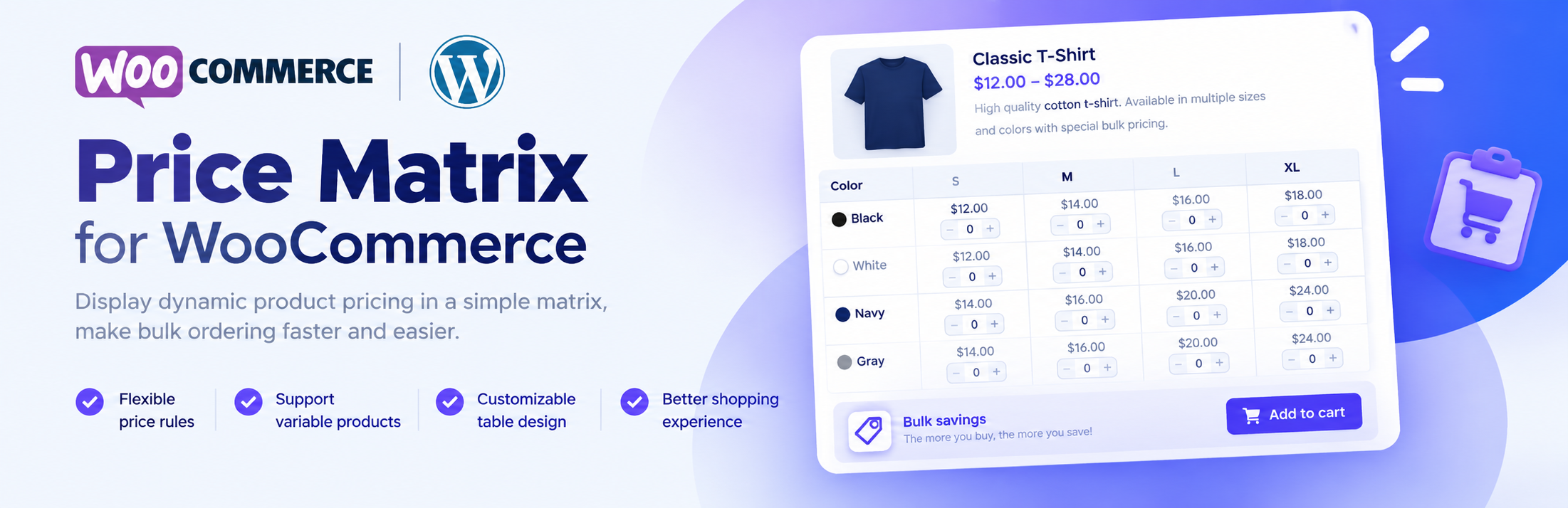
Price Matrix For WooCommerce helps to show the price of variable products become easier and more intuitive under price list.
📌 Free Features
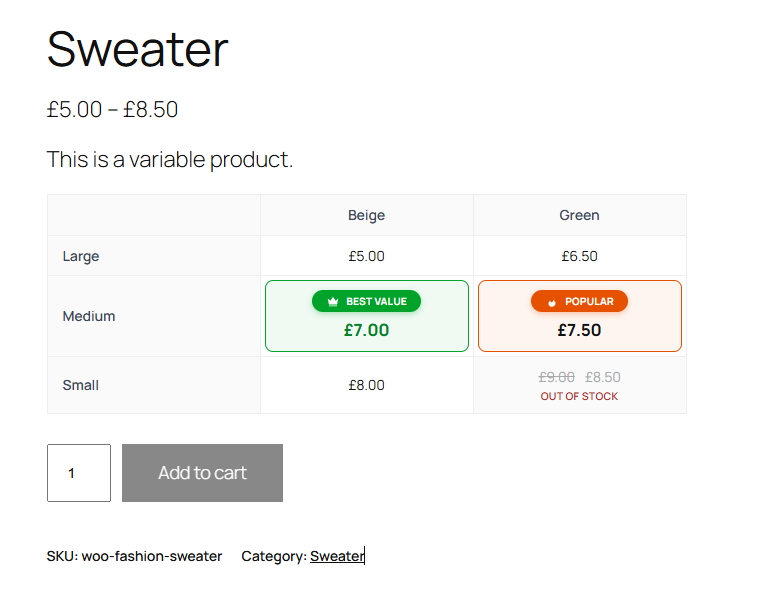
1. Display table Price Matrix
Replace frontend dropdown with a price matrix table.
2. Drag & drop order of variations
On the Edit Product page you have the ability to drag and drop the variation attributes in whatever order they need to be in.
3. Quick & Easy Enter Price
Enter regular and sale prices for every variation in one popup, with instant validation (the sale price must be lower than the regular price).
4. Badges: “Best Value” and “Popular”
Highlight a price cell with a badge. Label, text color, background color and order of each badge can be changed in the settings. Each badge can be used once per product.
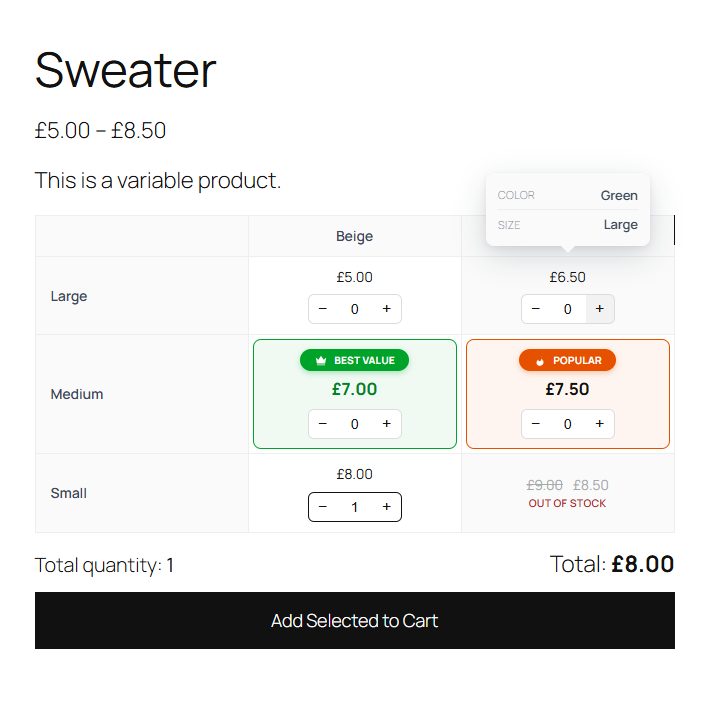
5. Bulk order (buy multiple variations at once)
Customers choose a quantity in each cell and add several variations to the cart with one “Add Selected to Cart” button. Stock, price and quantity limits are checked by WooCommerce.
6. Add to cart behaviour
Choose how the table works: select a variation, click a price to add it to the cart, or bulk order.
7. Out of stock cells
Variations that are out of stock or not purchasable are shown as unavailable and cannot be selected.
📌 PRO Features
1. Unlimited Products
With free version, support with two attributes. But with PRO version you use unlimited.
2. Support 04 attributes
Display 4 table styles: two attributes, three attributes width direction vertical, three attributes with direction horizontal, four attributes.
3. Premium Support
Get free support and free lifetime updates at https://azmarket.net/item/price-matrix-for-woocommerce
How it works
Tangkapan Layar


Tanya Jawab
Is this plugin compatible with the latest version of WordPress and WooCommerce?
Yes. Version 1.3.0 is tested with WordPress 7.1 and WooCommerce 11.2, and is compatible with High-Performance Order Storage (HPOS).
How do I add a badge to a price?
Edit the product, open “Input Price” in the Price Matrix box and click the tag icon next to a cell. Badge labels and colors are set in Price Matrix > Settings > Badges.
How do I enable bulk order?
Go to Price Matrix > Settings and choose “Bulk order (multiple variations)” in “Add to cart behaviour”. Each cell then gets a quantity box and an “Add Selected to Cart” button is shown under the table.
Can I add more badge types?
Yes, developers can use the
wppm_badgesfilter:add_filter( 'wppm_badges', function( $badges ) { $badges['new'] = array( 'label' => 'New', 'color' => '#ffffff', 'bg' => '#2271b1', 'order' => 3 ); return $badges; } );
Ulasan

Kontributor & Pengembang
“Price Matrix for WooCommerce” adalah perangkat lunak open source. Berikut ini mereka yang sudah berkontribusi pada plugin ini.
Kontributor
Terjemahkan “Price Matrix for WooCommerce” dalam bahasa Anda.
Tertarik mengembangkan?
Lihat kode, periksa repositori SVN , atau mendaftar ke log pengembangan melalui RSS.
Log Perubahan
1.3.1 – 2026-10-22
- Security: Nonce (CSRF) protection for the add to cart and bulk order requests, with automatic refresh on cached pages
- Security: Stricter validation of attributes, directions and order values sent from the product editor
- Security: The [wc_pricematrix] shortcode no longer shows prices of draft, private or password protected products
- Security: Colors from the settings are validated again before being printed in the page CSS
- Fixed: Click to add to cart now runs the same WooCommerce validation as the normal add to cart form
1.3.0 – 2026-10-22
- Added: Separate Regular / Sale price inputs in the “Input Price” popup, with instant validation and error tooltips
- Added: Badges “Best Value” and “Popular” per price cell (tag icon + popover picker), one badge of each type per product
- Added: Badge settings: label, text color, background color and order, with live preview
- Added: Bulk order mode: quantity box in each cell, totals and “Add Selected to Cart” button
- Added: “Add to cart behaviour” setting: Select variation / Click to add to cart / Bulk order
- Added: Out of stock and unavailable variations are shown as unavailable and cannot be selected
- Changed: New design for the “Input Price” popup (auto width, header, close button) and for frontend tooltips
- Changed: Popup and price matrix scripts/styles are refreshed automatically after updates (cache busting)
- Fixed: Saving prices no longer resets out of stock variations to “In stock”
- Fixed: “Input Price” popup notice was visible on non-product admin screens
- Fixed: Theme focus outline showing inside the quantity box
1.2.3 – 2026-10-21
- Added: Require WooCommerce to be active before the plugin can be activated
- Added: Declare compatibility with WooCommerce HPOS and Cart/Checkout blocks
- Fixed: Security – REST endpoints now require permission to edit the product, settings and price saving use nonces
- Fixed: Security – SQL injection in add to cart and price lookup queries
- Fixed: Add to cart from the matrix (moved to WooCommerce AJAX endpoint, cart is not loaded in REST requests)
- Fixed: Saving prices now uses WooCommerce CRUD so variation prices, lookup tables and caches stay in sync
- Fixed: PHP 8.x fatal errors and warnings (count() on null, undefined variables/properties, dynamic properties)
- Fixed: Price matrix and “hide dropdown” only applied to products with Price Matrix enabled
- Fixed: Checkout quantity column disappeared for products without quantity attribute
- Fixed: Replace deprecated wc_enqueue_js() and legacy WooCommerce script handles
- Changed: Text domain is now price-matrix-for-woocommerce (matches the plugin slug for WordPress.org language packs), new .pot file
- Changed: PRO notice is dismissible and only shown on plugin/product screens
- Changed: Settings page cleaned up (correct labels and help texts, reset now applies immediately)
- Tested: Compatible with WooCommerce 11.2
- Tested: Compatible with WordPress 7.1.3
1.2.2 – 2022-03-07
- Fixed: Undefined variable: show_tooltips
- Fixed: Notice: register_rest_route was called incorrectly is missing the required
permission_callbackargument - Added: Remove the limit of using only three products
1.2.1 – 2020-07-31
- Fixed: Load table
- Added: Support special characters in value of attributes, ex: Quotation mark (24″x32″),…
1.2.0 – 2019-03-24
- Added: Show all product enable Price Matrix at All Products page
- Added: Support 01 attribute
- Fixed: Remove/add row
1.0.0 – 2018-07-01
- Released