

Deskripsi
Easily find your medias on the solution of digital asset management Ephoto Dam and import directly into WordPress.
Related Links:
License
Copyright 2013-2024 Einden
Tangkapan Layar
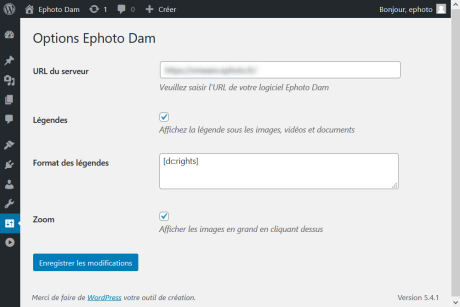
Administration interface 
Insert a block, call the Ephoto Dam software and select a media file 
Manage your media file easily in the Gutenberg editor
Blok
Plugin ini menyediakan 1 blok.
- Ephoto Dam
Instalasi
- Upload the full directory into your wp-content/plugins directory
- Activate the plugin at the plugin administration page
- Open the plugin configuration page and configure the plugin
- The Ephoto Dam button is present in the blocks menu when you modify your pages and publications

Kontributor & Pengembang
“Ephoto Dam” adalah perangkat lunak open source. Berikut ini mereka yang sudah berkontribusi pada plugin ini.
Kontributor
“Ephoto Dam” telah diterjemahkan dalam 3 bahasa. Terima kasih kepada para penerjemah untuk kontribusi-nya.
Terjemahkan “Ephoto Dam” dalam bahasa Anda.
Tertarik mengembangkan?
Lihat kode, periksa repositori SVN , atau mendaftar ke log pengembangan melalui RSS.
Log Perubahan
3.1.6
- WordPress 6 support
3.1.5
- Fix minor error with WordPress 5.7
3.1.4
- Fixed Ephoto Dam 4.0 compatibility bug
3.1.3
- Bugs fix
3.1.2
- Ephoto Dam login flags support
3.1.0
- Classic editor (TinyMCE) support
- WordPress 5.5 support
3.0.0
- WordPress 5 support
2.5.0
- German translation
2.4.0
- Ephoto 3.5.0 support
2.3.0
- Minor bug fix
2.2.0
- Bugs fix
2.0.0
- Second release
1.0.1
- Bugs fix
1.0.0
- First release