
Deskripsi
iSpring Learn JWT lets you easily integrate your WordPress blog with your iSpring Learn account so that your users can seamlessly log into both services with one login/password pair.
Tangkapan Layar

Instalasi
- Activate the plugin through the ‘Plugins’ menu in WordPress
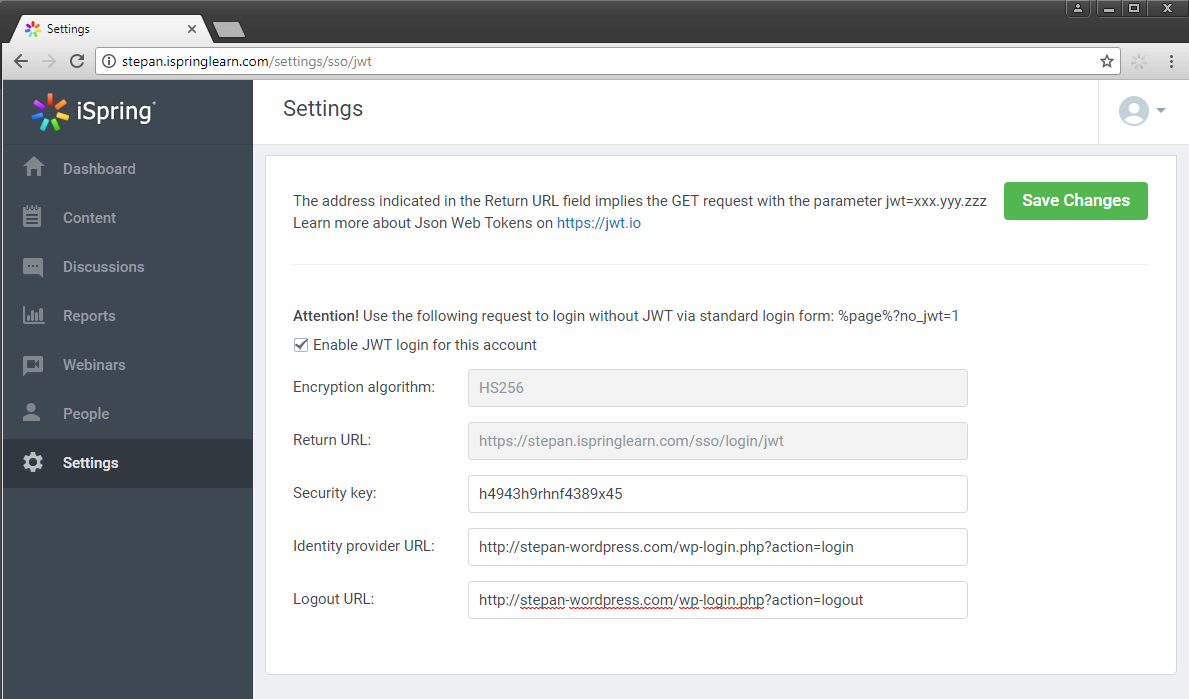
- Go to your iSpring Learn account to configure the JWT settings. To access the JWT settings follow https://yourdomain.ispringlearn.com/settings/sso/jwt
- Configure the plugin through the “General settings” page in the plugin, you can retrieve the info requested here from the JWT settings page of your iSpring Learn account.
Tanya Jawab
-
How can I get my iSpring Learn platform?
-
You are welcome to get a free 14-day trial of iSpring Learn at http://www.ispringsolutions.com/ispring-learn to test all of its features.
Ulasan
Belum ada ulasan untuk plugin ini.
Kontributor & Pengembang
“iSpring Learn JWT” adalah perangkat lunak open source. Berikut ini mereka yang sudah berkontribusi pada plugin ini.
Kontributor
“iSpring Learn JWT” telah diterjemahkan dalam 1 bahasa. Terima kasih kepada para penerjemah untuk kontribusi-nya.
Terjemahkan “iSpring Learn JWT” dalam bahasa Anda.
Tertarik mengembangkan?
Lihat kode, periksa repositori SVN , atau mendaftar ke log pengembangan melalui RSS.