
Deskripsi
The WP admin area has so many shades of gray. Sometimes it can be hard to point out which plugins are active or inactive.
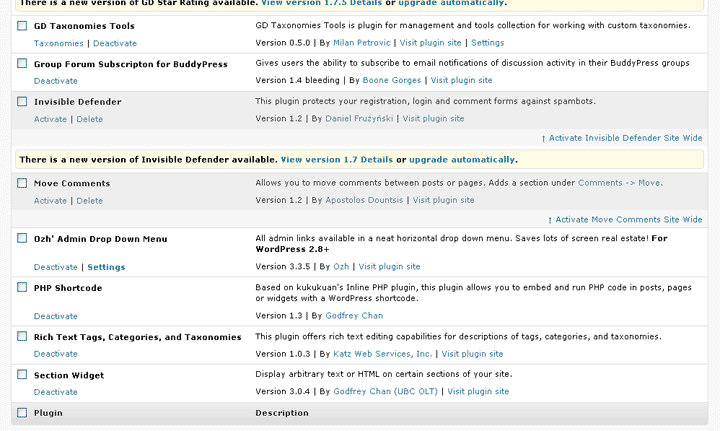
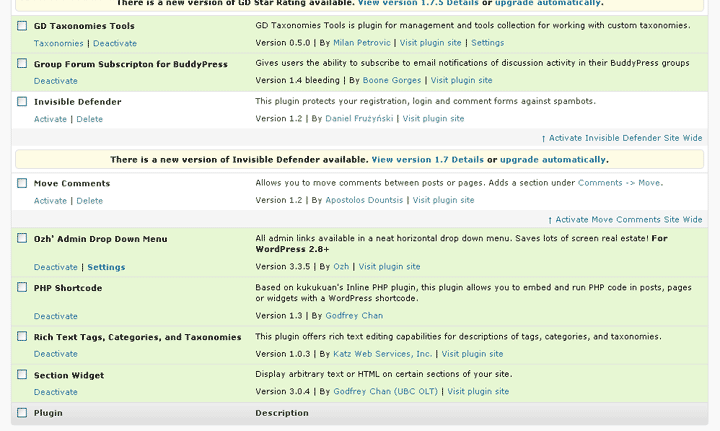
This simple plugin changes your plugins screen so you can easily identify active plugins with a coat of green!
Tangkapan Layar
Instalasi
For WordPress users
- Download, install and activate the plugin.
For WordPress Network admins
1. Either network activate the plugin or upload green-active-plugins.php to the /wp-content/mu-plugins/ directory and all your WP sites will enjoy this plugin or you can activate the plugin individually on each sub-site like regular WordPress users (see above)
Tanya Jawab
- Okay, so what does this plugin really do?
-
This is a very small plugin that adds a little CSS to the plugins screen.
Specifically:
- Active plugins are now colored green, instead of white.
- Inactive plugins are now white, instead of gray.
- The plugin update message prompt is now center-aligned, instead of aligned left.
- Why green?
-
It’s a throwback to WP 2.7. I first created this plugin for WP 2.8.
Trivia: It was also my very first plugin! 🙂 - Does this plugin do wonders if I’m color-blind?
-
Probably not. But let me know 😉
Ulasan
Belum ada ulasan untuk plugin ini.
Kontributor & Pengembang
“Green Active Plugins!” adalah perangkat lunak open source. Berikut ini mereka yang sudah berkontribusi pada plugin ini.
Kontributor
Terjemahkan “Green Active Plugins!” dalam bahasa Anda.
Tertarik mengembangkan?
Lihat kode, periksa repositori SVN , atau mendaftar ke log pengembangan melalui RSS.
Log Perubahan
1.1
- I lied. There’s a second version. Updated for WP 3.2+. Mostly a test to see if I can update plugins from GitHub! 😉
1.0
- First and probably only version!