

Deskripsi
Dieses Plugin ermöglicht es, jedem Woocommerce Produkt Pfandwerte zuzuweisen und somit Dinge wie Flaschenpfand abzubilden. Deutsche Übersetzung liegt bei. Für Anpassungen bitten wir um Kontaktaufnahme.
This plugin was written for a German beverage store. They needed deposits for bottles as well as boxes, which would be displayed separately and excluded from tax calculation.
With this plugin you can add a deposit to any WooCommerce product by adding the price under Products - Deposit Types.
Note: Because WordPress allows users to add multiple values and
comma-separate them, you have to input the prices with ‘.’ (period) as the decimal separator, independent of WooCommerce settings.
Features
- Translation-ready (German translation included)
- Uses built-in functionality of WordPress and Woocommerce thus fully compatible with, e.g. WP Export/Import tools
- Developer-friendly (more hooks & documentation to come)
Custom code
Since there are a lot of different ways you or your customer may want this set up, please contact us for customizations such as:
- Compatibility with WooCommerce German Market (disable taxing off deposit)
- Link deposit to shipping zones’ methods or customer language
- Force sells (e.g. 1 beer crate for every x bottles)
- Enabling of tax calulation
Github Repository: https://github.com/nerdissimo-de/woocommerce-pfand
Contact: http://www.nerdissimo.de
Filters
`get_deposit`
(int) runs when deposit is calculated.
`wc_deposit_settings`
(array) runs when the settings tab is being configured.
`add_deposit_value_to_totals`
(bool) runs before deposit fee is added (to do: rename?)
`dep_total_before_add_fee`
(int) runs before deposit fee is added
`tax_class_before_add_fee`
(string) runs before deposit fee is added
`display_deposit`
(bool) runs when the plugin determines to add deposit
Tangkapan Layar


Instalasi
- Upload
woo-pfand/to the/wp-content/plugins/directory - Activate the plugin through the
Pluginsmenu in WordPress - Configure the plugin through
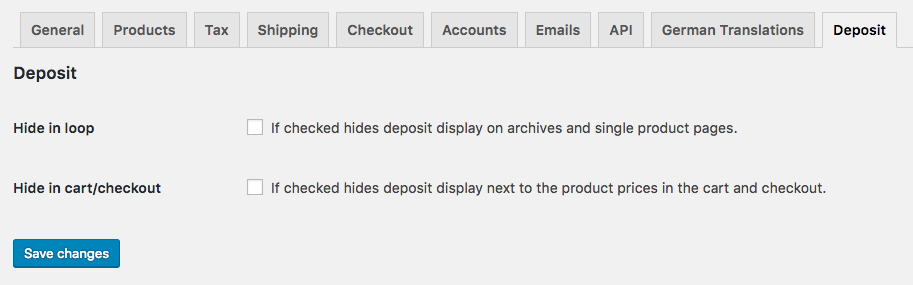
Woocommerce -> Settings -> Tab: Deposit - Go to
Products - Deposit Typesand create deposit prices as you would add tags - Add deposit prices to your products
Ulasan


Kontributor & Pengembang
“Pfand (Deposit) for WooCommerce Products” adalah perangkat lunak open source. Berikut ini mereka yang sudah berkontribusi pada plugin ini.
Kontributor
Terjemahkan “Pfand (Deposit) for WooCommerce Products” dalam bahasa Anda.
Tertarik mengembangkan?
Lihat kode, periksa repositori SVN , atau mendaftar ke log pengembangan melalui RSS.
Log Perubahan
= 2.0.0
* First release on WP Repository