
Deskripsi
miniDesk adds an AI live chat to your WordPress site in one click. The AI answers your customers from your own pages, and your team takes over from the miniDesk inbox whenever it is needed.
What you get:
- One-click connection. Install, click Connect, and the chat is live on your site. No code to copy.
- AI that answers customer questions from your site’s content. The free plan includes 75 AI conversations a month, with no card.
- Make the chat yours from WordPress: colour, position, theme, opening message and language, with a live preview of the chat on a phone.
- Choose whether the AI answers by itself or writes drafts for your team to send.
- Recognized signed-in users. The chat knows who is signed in to WordPress, and nobody can pretend to be them.
- WooCommerce order lookups. The AI answers “where is my order?” with the real status and tracking link, and your team sees the customer’s orders next to the conversation.
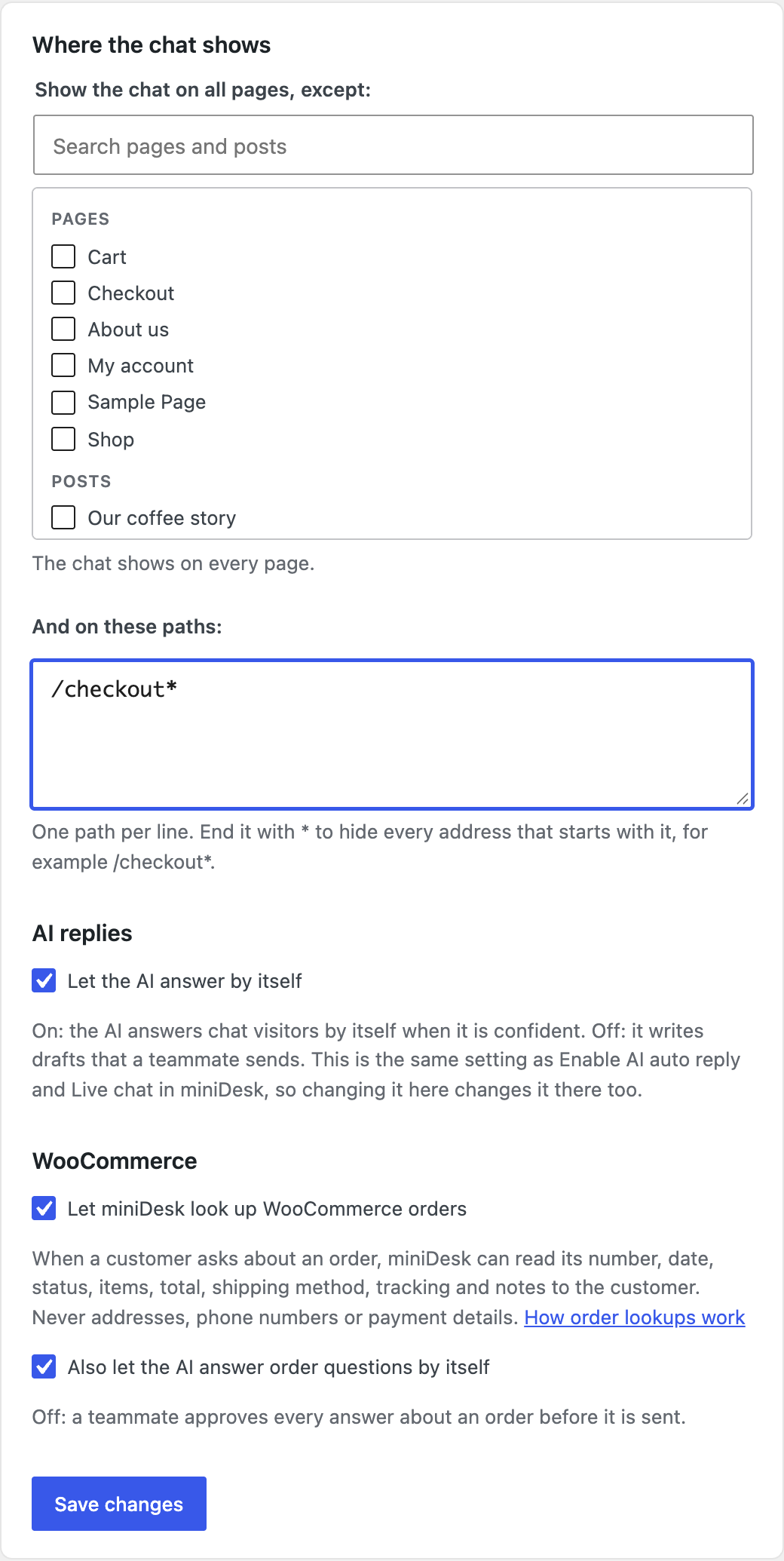
- Hide the chat on chosen pages or paths, like your checkout.
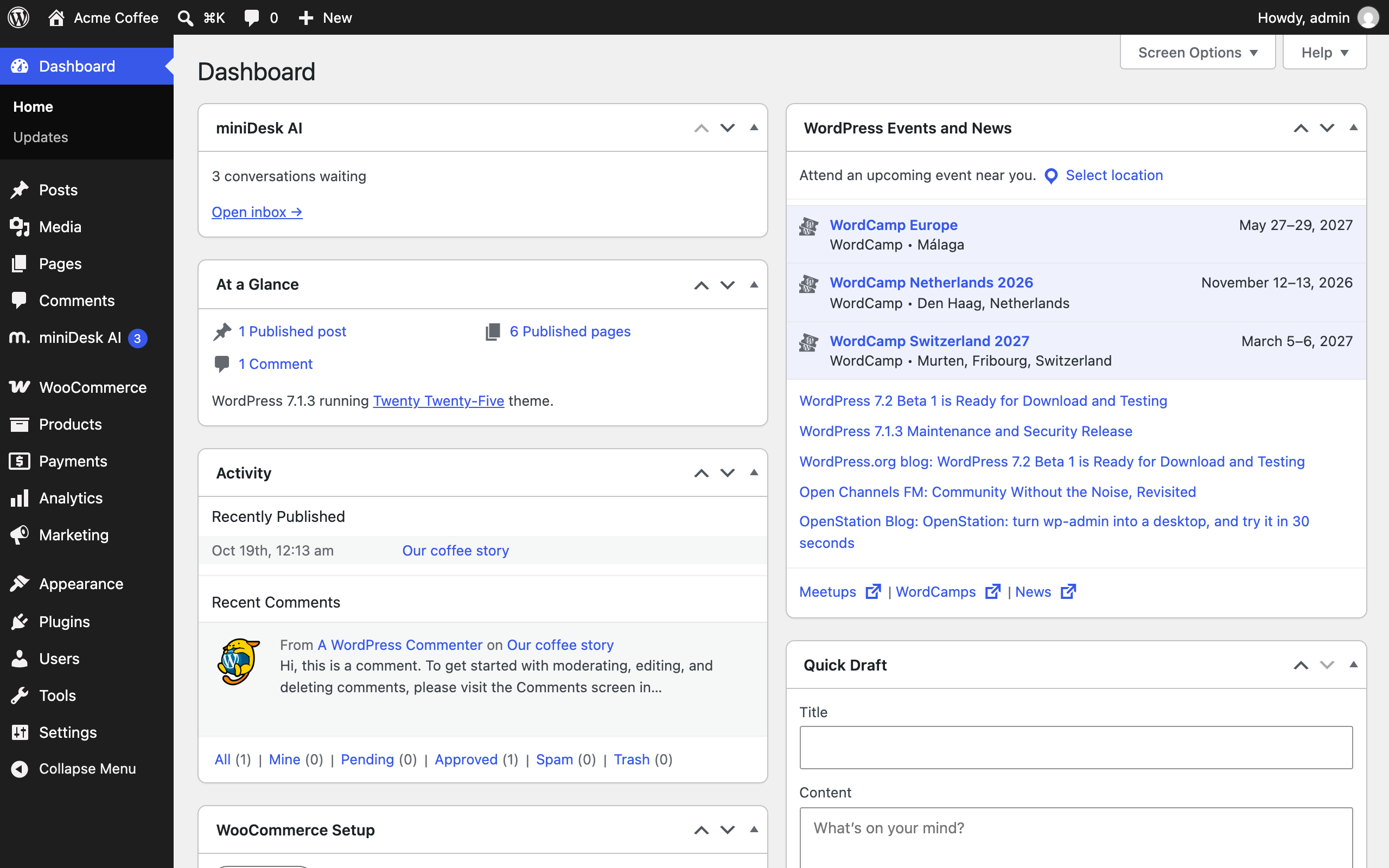
- The number of conversations waiting for a reply, right in your WordPress admin.
- Works on any WordPress site, with or without WooCommerce.
- The chat speaks English, French, German, Spanish and Portuguese (Brazil).
How it works:
The plugin connects your WordPress site to miniDesk.ai, where your team answers conversations and manages its plan. The chat appears on your site, conversations land in your miniDesk inbox, and your replies reach customers in the chat or by email.
WooCommerce orders, without API keys:
Other chat tools ask you to create a WooCommerce API key, which opens every order in full. miniDesk asks the plugin instead, and the plugin only ever sends what a customer can see in their own account: order number, date, status, items, total, shipping method, tracking and notes to the customer. Never addresses, phone numbers, payment details or private notes.
Only proven customers see their orders: people signed in to your store, people who emailed you from the order’s address, and anyone who gives the order number with its checkout email. A stranger typing someone else’s email gets nothing.
Order lookups are off until you turn them on. You also choose whether the AI sends order answers by itself or a teammate approves them first.
Privacy and data:
The plugin sends data to miniDesk.ai to make the chat work. See the External services section below for details.
Source: assets/preview.js is the chat preview from miniDesk’s own dashboard, running on WordPress’s React. It is built, unminified, with esbuild from the files in assets/preview-src/, which also holds the build script and a README.
Documentation:
- WordPress: https://docs.minidesk.ai/integrations/wordpress
- WooCommerce: https://docs.minidesk.ai/integrations/woocommerce
External services
This plugin connects your site to miniDesk.ai, an external service that provides the live chat, the AI and the inbox. Data is sent to miniDesk.ai in these situations:
When you connect: your browser goes to app.minidesk.ai with your site address, site name and the address of the plugin’s page, so you can sign in and pick a workspace. Back on your site, the plugin sends your site URL, WordPress, WooCommerce and plugin versions, and a public key to api.minidesk.ai.
Hourly, and when an administrator opens the WordPress admin (at most once a minute): the plugin sends your site address, the versions above and which of its settings are on to api.minidesk.ai, which answers with the waiting count, your plan and usage, and your chat’s settings. A copy of a connected site sends nothing.
While the miniDesk AI page is open: the “Your chat” preview is drawn by the plugin itself and shows your workspace logo, loaded from miniDesk’s file storage. Saving the card sends the changed settings to api.minidesk.ai.
When a visitor uses the chat: the chat script loads from cdn.minidesk.ai, and messages go to api.minidesk.ai, where conversations are stored.
When a signed-in WordPress user opens the chat: on a connected site, the plugin sends their WordPress user ID, email, name and a signed token proving they are signed in. With only a pasted public key, their email and name are sent with their first message and stored as unverified. The plugin sets a first-party cookie, minidesk_li, when a user signs in: a per-user marker made with your site’s secret key, holding no personal data, never sent to miniDesk, SameSite=Lax, removed when they sign out. It lets the page know to ask WordPress who is signed in, and drops the previous person’s conversation when someone else signs in.
When order lookups are on: miniDesk sends signed requests to your site’s REST API. Your site answers only for proven customers (signed in, emailed from the order’s address, or giving the order number with its checkout email), and only with order number, date, status, items, total, shipping method, tracking and notes to the customer. Never addresses, phone numbers, payment details, private notes, IP addresses or user agents. miniDesk keeps no copy of your orders: they are fetched when needed.
What miniDesk stores: conversations, customer details (name, email and what they write), and AI activity logs.
- Terms of service: https://minidesk.ai/en/terms/
- Privacy policy: https://minidesk.ai/en/privacy/
Tangkapan Layar




Instalasi
- Install the plugin from Plugins > Add New, or upload the
minidesk-aifolder to/wp-content/plugins/. - Activate the plugin.
- Go to miniDesk AI in the WordPress admin.
- Click Connect with miniDesk.
- Sign in or create an account, pick a workspace, and click Connect.
The chat is now live on your site. Open the inbox and manage your plan from buttons on the same page.
Tanya Jawab
-
Do I need a miniDesk account?
-
Yes. You can create one, for free, while connecting.
-
Is it free?
-
The plugin is free, and miniDesk’s free plan includes 75 AI conversations a month. Paid plans start when you need more: see https://minidesk.ai/en/pricing/.
-
Does the chat show a link to miniDesk?
-
On the free plan, the chat window shows “Powered by miniDesk.ai”, linking to minidesk.ai. It is drawn by the miniDesk service inside the chat, the plugin adds no link or credit to your pages, and paid plans remove it.
-
Does it work without WooCommerce?
-
Yes. Everything but order lookups works on any WordPress site.
-
Can I change how the chat looks from WordPress?
-
Yes. The Your chat card has the same settings as the chat on your miniDesk Channels page, with a live preview. Changing them in WordPress changes them in miniDesk, and the other way round. Only an owner of your miniDesk workspace can change them.
-
Can the AI answer by itself?
-
Yes. Tick Let the AI answer by itself. It is the same setting as Enable AI auto reply with Live chat in miniDesk. When it is off, the AI writes drafts and a teammate sends them.
-
Do I need to create WooCommerce API keys?
-
No. The plugin answers order questions itself. Tick Let miniDesk look up WooCommerce orders and you are done.
-
Why does a teammate still approve order answers?
-
The AI sends order answers by itself only when both Let the AI answer by itself and Also let the AI answer order questions by itself are on.
-
What happens when a customer leaves the page?
-
If they gave an email address, the conversation continues by email.
-
Does it slow down my site?
-
No. The chat loads after your page and never blocks it. If miniDesk is unreachable, your site behaves as if the plugin were not there.
-
Does it work with caching plugins?
-
Yes. Pages never carry a visitor’s details. The plugin clears the cache of LiteSpeed Cache, WP Rocket, W3 Total Cache and WP Super Cache when it needs to; with another one, clear it yourself after connecting or changing where the chat shows.
-
What happens on a staging copy of my site?
-
The copy shows no chat and never touches the original site’s connection. To use miniDesk there, click Connect this site on its miniDesk AI page.
-
How do I disconnect?
-
Click Disconnect on the miniDesk AI page, or disconnect from the Channels page in miniDesk. Deleting the plugin disconnects it and removes its settings.
Ulasan
Belum ada ulasan untuk plugin ini.
Kontributor & Pengembang
“miniDesk AI: Free Live Chat & AI Chatbot” adalah perangkat lunak open source. Berikut ini mereka yang sudah berkontribusi pada plugin ini.
Kontributor
Terjemahkan “miniDesk AI: Free Live Chat & AI Chatbot” dalam bahasa Anda.
Tertarik mengembangkan?
Lihat kode, periksa repositori SVN , atau mendaftar ke log pengembangan melalui RSS.
Log Perubahan
1.0.0
- Initial release.
- One-click connection to miniDesk, with the chat live straight away.
- “Your chat”: colour, position, theme, opening message, language and more, with a live preview.
- “Let the AI answer by itself”, the same setting as in miniDesk.
- Signed-in WordPress users recognized and verified.
- Hide the chat on chosen pages and paths.
- WooCommerce order lookups for the AI, with no API keys, and orders shown next to the conversation in miniDesk.
- The waiting count in the WordPress admin menu and on the Dashboard.
- Staging copies detected and kept silent.