

Deskripsi
HUP – Campos SEO con IA connects your WordPress site to OpenAI or Google Gemini to write the fields you usually leave half-finished: the product description, the post excerpt, the tags, the alt text of the featured image, and the SEO and social fields — title, meta description, focus keyword and Open Graph.
Where each one is written depends on your site, not on the plugin. If you run RankMath, Yoast SEO or All In One SEO, it is detected automatically and the text goes into their fields. If you run none, the plugin stores the text in its own fields and prints the meta tags itself. What the AI adds is the text: written in your language, for your country, with the keyword where it belongs.
Please note: the plugin’s admin interface and its AI prompts are in Spanish. This readme is in English as required by WordPress.org, but the plugin is aimed at Spanish-speaking site owners.
What it does
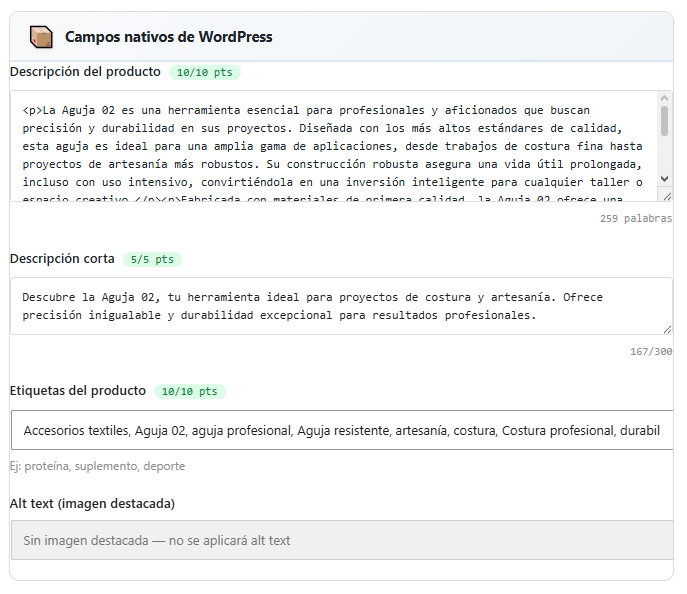
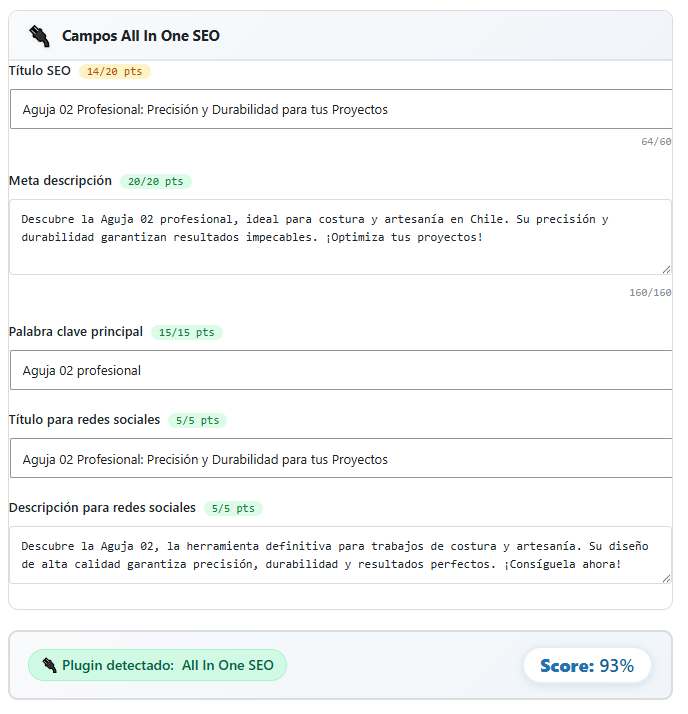
- Fills in every field it can write with AI: long description, short description or excerpt, tags, alt text of the featured image, SEO title, meta description, focus keyword and the Open Graph title and description.
- Creates complete blog posts from a topic, with a choice of tone and length.
- Improves existing posts, with a preview before the changes are applied.
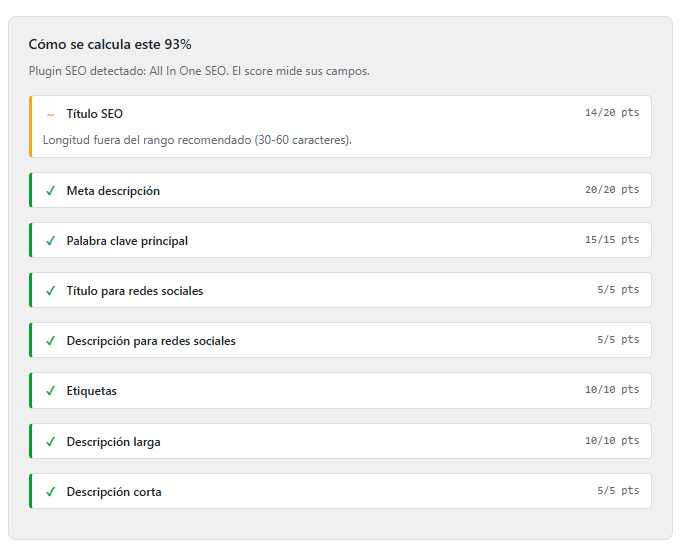
- Scores each piece of content from 0 to 100 based on how complete it is, and explains which fields count and which are missing.
- Scans your whole catalogue to recalculate those percentages without spending any AI credit.
- Lets you edit any field by hand from a modal, including your SEO plugin’s fields.
The score and your SEO plugin
If you use RankMath, Yoast SEO or All In One SEO, the plugin detects it on its own, writes into their fields and scores them alongside the native ones. If you don’t use any, it writes into its own fields, prints the meta tags itself and scores what applies. Either way, nothing is held back and 100% is reachable.
Other features
- A business profile that steers every text: site type (online store, services, fully digital business or blog), industry, audience, differentiators, delivery mode and geographic scope. A local business gets its city in titles and keywords; a national, international or online one gets keywords without a location.
- Generation log with tokens and costs, with configurable automatic pruning.
- Cost calculator by model and volume.
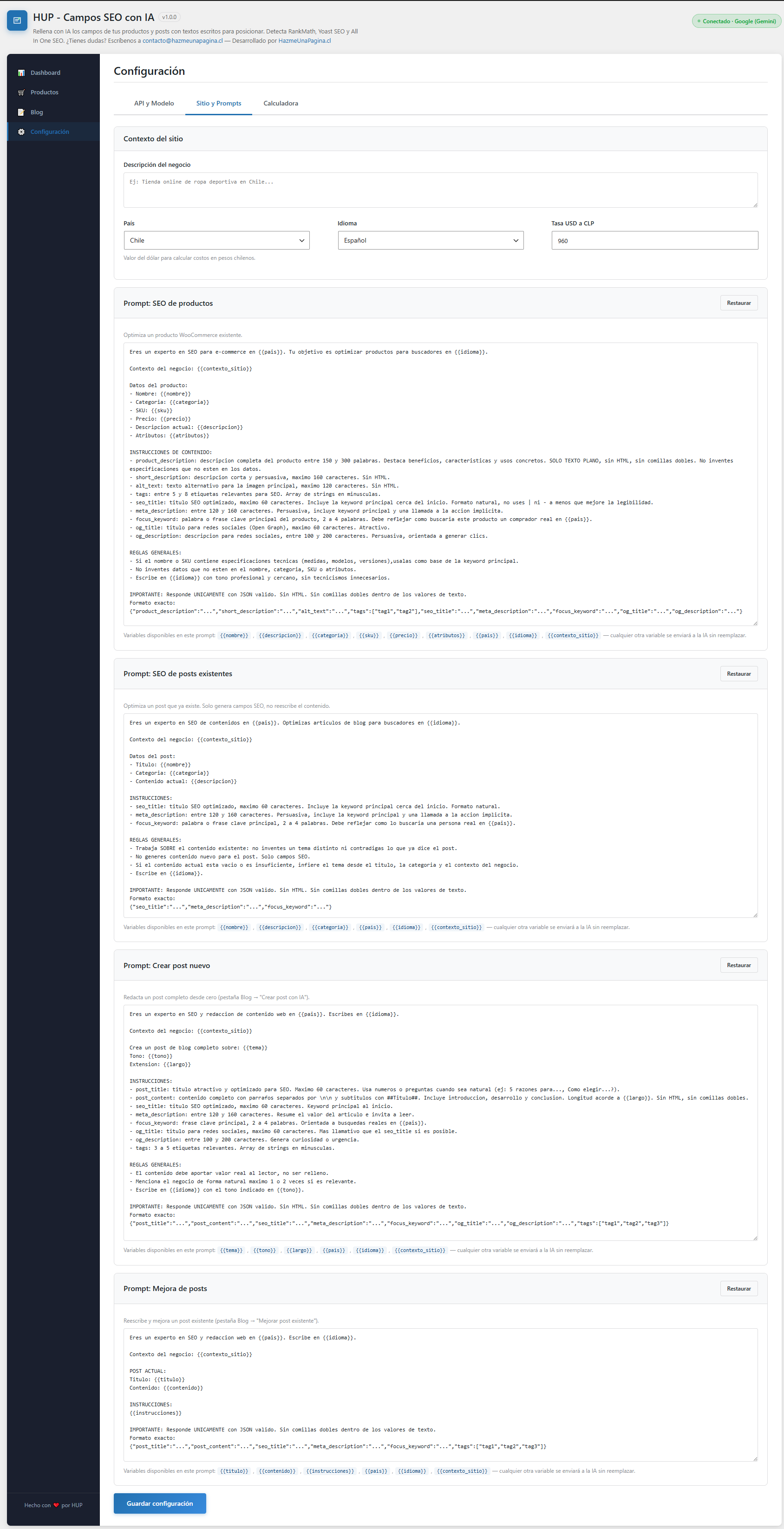
- Customisable prompts with dynamic variables.
- API keys encrypted with AES-256-CBC.
Supported AI providers
- OpenAI: GPT-6 Luna, GPT-6.1 Terra, GPT-6.1 Sol, GPT-6 Astra
- Google: Gemini 3.5 Flash-Lite, Gemini 3.8 Flash, Gemini 4 Argon
Important: this plugin relies on external AI services to work. See the “Third-Party Services” section below for what data is sent and to whom.
Developed with the assistance of AI tools under direct human supervision.
Third-Party Services
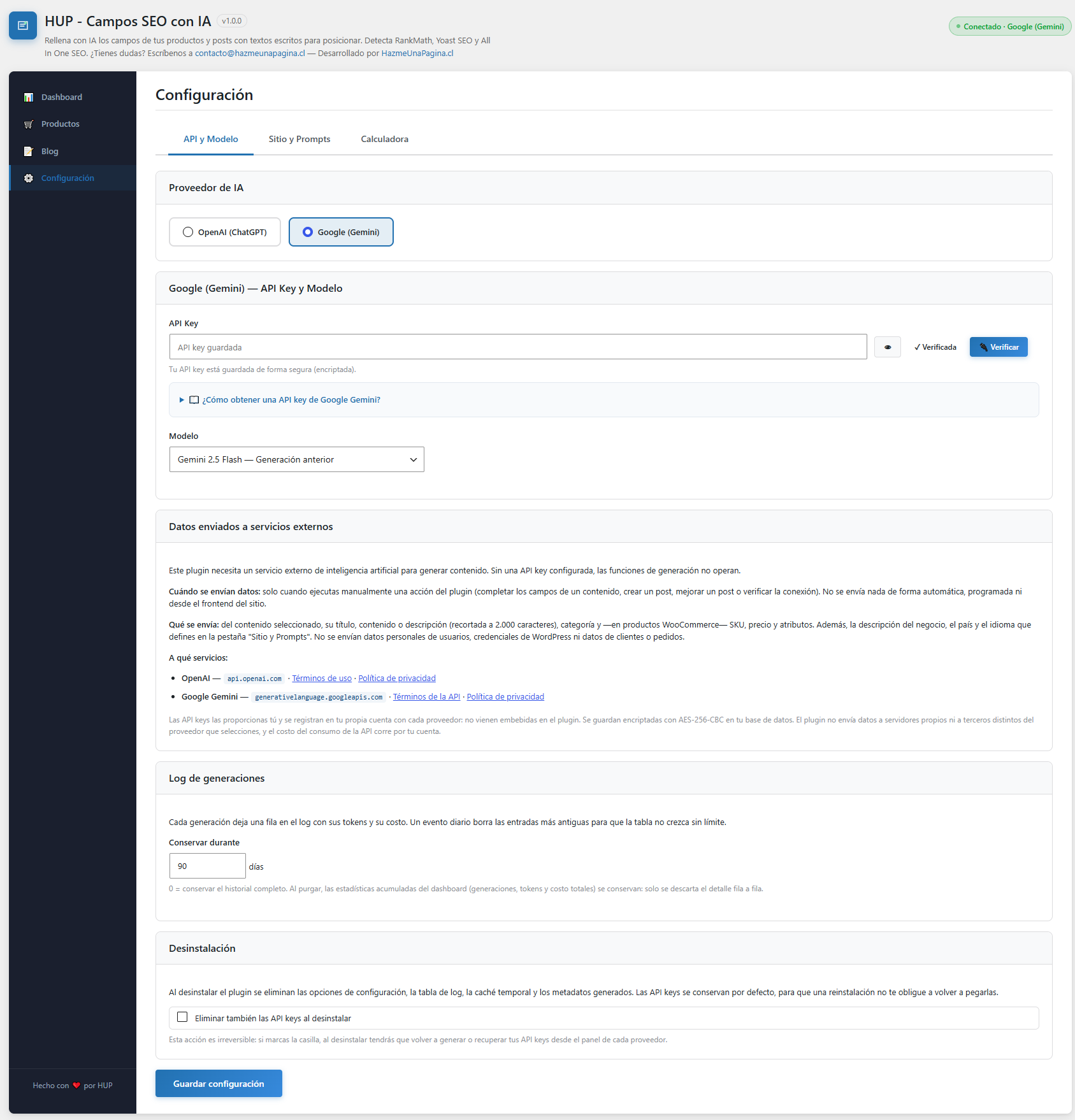
This plugin requires an external artificial intelligence service in order to generate content. Without a configured API key, the generation features do not operate.
When data is sent
Only when an administrator manually triggers an action in the plugin: completing the fields of a piece of content, creating a post, improving a post, or testing the API key connection. The plugin does not send anything automatically, on a schedule, or in the background, and it sends nothing from the site’s front end.
What data is sent
From the selected content: title, the text of its content or description (up to 2,000 characters when completing fields, and up to 12,000 when improving a post), category and, for WooCommerce products, SKU, price and attributes. It also sends the business profile you define in the plugin (site type, industry, description, target audience, differentiators, geographic scope, area and delivery mode), plus the country and language.
Every request asks the provider not to store it (store: false). This matters for Google Gemini, which since October 2026 stores requests by default for new paid-tier projects. Anything a provider keeps on its own terms (for example, for abuse monitoring) is governed by its policies.
No personal user data, WordPress credentials, email addresses, or WooCommerce customer or order data is sent.
To which services
OpenAI — used when you select OpenAI as the provider. Data is sent to https://api.openai.com/v1/chat/completions.
- Terms of use: https://openai.com/policies/terms-of-use
- Privacy policy: https://openai.com/policies/privacy-policy
Google Gemini — used when you select Google as the provider. Data is sent to https://generativelanguage.googleapis.com/v1beta/models/.
- API terms: https://ai.google.dev/gemini-api/terms
- Privacy policy: https://policies.google.com/privacy
About API keys and your data
API keys are provided by the user and registered in their own account with each provider: they are not bundled with the plugin. They are stored encrypted with AES-256-CBC in your own database.
The plugin does not send data to any servers of its own, nor to any third party other than the AI provider you select, and it keeps no copies of your content outside your own WordPress database.
By using this plugin you accept the terms of the AI provider you configure. The cost of API usage is the user’s responsibility.
Tangkapan Layar
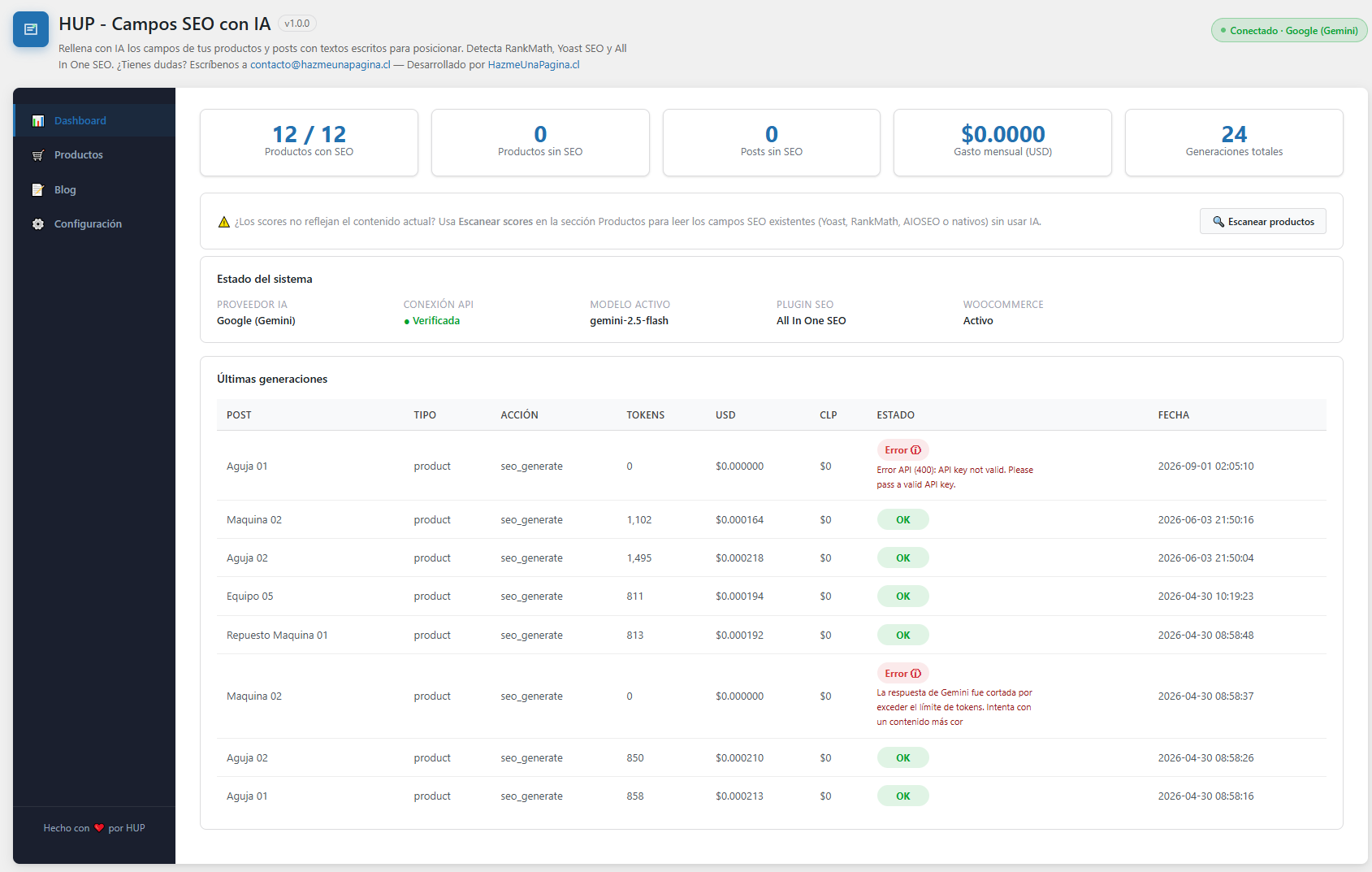

Instalasi
- Upload the
hup-campos-seo-con-iafolder to the/wp-content/plugins/directory. - Activate the plugin through the Plugins menu in WordPress.
- Go to Campos SEO IA Configuración.
- Select your AI provider and enter your API key.
- Click “Verificar” (Test connection) and then “Guardar configuración” (Save).
Tanya Jawab
-
Which fields does the AI fill in?
-
Every field it knows how to write: the product’s long description, the short description or excerpt, the tags, the alt text of the featured image, the SEO title, the meta description, the focus keyword and the Open Graph title and description. On a post it does not touch the article body when completing fields: rewriting it is what the “Mejorar” (Improve) action is for.
By default, “Completar” only fills the fields that are empty and only asks the AI for those, so nothing you wrote is replaced. If you want it to rewrite existing text too, enable “Sobrescribir” under Configuración Sitio y Prompts.
Where they are written depends on your setup: into your SEO plugin’s fields if you have one, or into the plugin’s own fields if you don’t, in which case it prints the meta tags itself. You can also edit any of them by hand from the modal.
-
Do I need WooCommerce to use this plugin?
-
No. WooCommerce is optional. Without it, the plugin works for blog posts. The Products section requires WooCommerce to be active.
-
Which SEO plugin do I need?
-
None is required. The plugin automatically detects RankMath, Yoast SEO and All In One SEO. With no SEO plugin active it runs in native mode: it uses the WordPress and WooCommerce fields and outputs the meta tags itself.
-
Why doesn’t my score reach 100?
-
Because a field is missing. Click the percentage on any row and you will see the breakdown: which fields are being measured on your installation, which are complete, which are partial, and how much each one contributes. Anything still missing can be written there by hand, and it counts the same.
-
Can I complete many products at once?
-
This version completes one piece of content at a time, using the “Completar” button on each row. The score scan does go through the whole catalogue, but it uses no AI: it only re-reads the fields that already exist and recalculates the percentages.
-
Where do I get an API key?
-
- OpenAI: https://platform.openai.com/api-keys
- Google Gemini: https://aistudio.google.com/app/apikey
-
Are API keys stored securely?
-
Yes. API keys are encrypted with AES-256-CBC using your WordPress AUTH_KEY before being saved to the database.
-
What happens to my data when I uninstall the plugin?
-
Uninstalling removes the configuration options, the log table, the temporary cache and the metadata generated by the plugin. API keys are kept by default, so that reinstalling does not force you to paste them again. If you would rather delete those too, tick the “Eliminar también las API keys al desinstalar” box under Configuración API y Modelo before uninstalling.
Ulasan
Belum ada ulasan untuk plugin ini.
Kontributor & Pengembang
“HUP – Campos SEO con IA” adalah perangkat lunak open source. Berikut ini mereka yang sudah berkontribusi pada plugin ini.
Kontributor
Terjemahkan “HUP – Campos SEO con IA” dalam bahasa Anda.
Tertarik mengembangkan?
Lihat kode, periksa repositori SVN , atau mendaftar ke log pengembangan melalui RSS.
Log Perubahan
1.0.1
- New business profile: site type (online store, services, fully digital business or blog), industry, audience, differentiators, delivery mode and geographic scope (local, regional, national or international). National sites now get keywords without city names; local ones get their city in titles and keywords.
- Rewritten default prompts, following current OpenAI and Gemini guidance. Prompts you never edited are upgraded automatically; customised ones are kept as they are.
- “Completar” now fills only empty fields by default and asks the AI only for those. A new “Sobrescribir” option restores replacing existing text.
- Generated descriptions and excerpts are saved through WordPress: posts keep a revision and WooCommerce refreshes its product data.
- The edit modal only saves the fields you changed, so embeds and other HTML in the content are no longer stripped.
- SEO fields can be edited in the modal without an SEO plugin, and the generated SEO title is now used as the page title.
- “Mejorar” applies only the selected options, previews the full proposed content, warns about images or embeds that would be lost, saves proper HTML and refuses posts too long to rewrite in full.
- Requests ask OpenAI and Gemini not to store them (store: false).
- Lowered the minimum PHP version to 8.0.
- Updated model catalogue: GPT-6 Luna, GPT-6.1 Terra, GPT-6.1 Sol and GPT-6 Astra for OpenAI; Gemini 3.5 Flash-Lite, Gemini 3.8 Flash and Gemini 4 Argon for Google. Models that the providers have retired or are retiring (GPT-4 Turbo, GPT-5, GPT-4o, Gemini 2.5 and Gemini 3.7 Flash) were removed; if you had one selected, the plugin switches to the provider’s default.
- New defaults: GPT-6 Luna and Gemini 3.8 Flash. Gemini 2.5 Flash is no longer available to new Google accounts.
- Reasoning models now use a low reasoning effort and get enough output room, so responses are no longer cut short and the connection test works with GPT-5 and later.
- OpenAI now uses Structured Outputs, like Gemini already did, so every response follows the expected format.
- A response cut off by the token limit now shows an error instead of saving incomplete fields.
- Clearer errors when a model is overloaded or not included in your provider plan (for example, Gemini 4 on Google’s free tier).
- Logged costs now include input tokens and, for Gemini, reasoning tokens. Announced price increases apply automatically on their date.
- Fixed accented characters and emoji being corrupted when a malformed response had to be recovered.
- Responses are no longer cached when caching is not requested.
1.0.0
- First public release.
- Fills in WooCommerce products and posts with AI: long description, short description or excerpt, tags, alt text, SEO title, meta description, focus keyword and Open Graph.
- OpenAI (GPT-5, GPT-5 Mini, GPT-5 Nano, GPT-4o, GPT-4o Mini, GPT-4 Turbo) and Google Gemini (3.7 Flash, 2.5 Flash, 2.5 Pro, 2.5 Flash Lite) providers.
- Creation of complete blog posts with AI, with configurable tone and length.
- Improvement of existing posts, with a preview before applying.
- Score from 0 to 100 with a breakdown: which fields are measured on your installation and how much each one contributes.
- Catalogue-wide score scanning that uses no AI.
- Manual edit modal for every field, including your SEO plugin’s.
- Automatic detection of RankMath, Yoast SEO and All In One SEO, plus a native mode that outputs meta tags.
- Warning when a customised prompt asks for fields the installation does not fill in.
- Generation log with tokens and costs, with configurable automatic pruning.
- Cost calculator by model and volume.
- Customisable prompts with dynamic variables.
- API keys encrypted with AES-256-CBC.