

Deskripsi
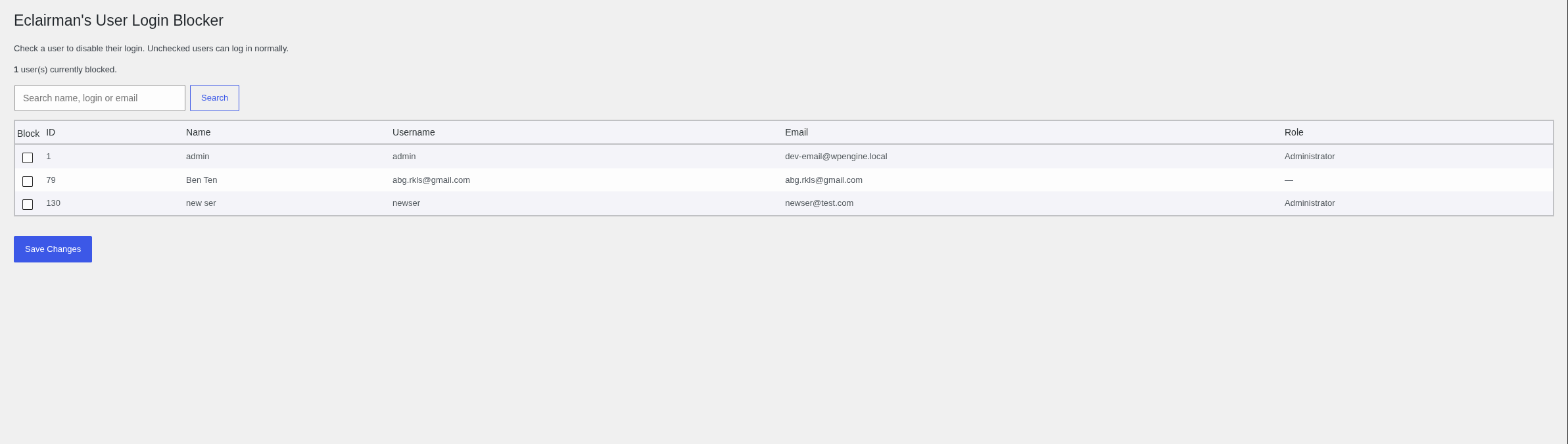
Eclairman’s User Login Blocker lets an administrator prevent chosen user accounts from logging in, while everyone else logs in normally.
Blocked users cannot authenticate, and if they already have an active session they are redirected away from the WordPress admin.
Features:
- Block or allow any user with a single checkbox.
- Searchable, sortable user table showing ID, name, username, email and role.
- Sticky table header and scrollable list for large sites.
- Blocked users made through search filters are preserved on save.
- No configuration required — nothing is blocked until you choose to block it.
Tangkapan Layar
Instalasi
- Upload the plugin files to the
/wp-content/plugins/disable-specific-user-logindirectory, or install the plugin through the WordPress Plugins screen directly. - Activate the plugin through the “Plugins” screen in WordPress.
- Go to the “Disabled specific user login” menu item (or the “Settings” link on the Plugins screen) to choose which users to block.
Tanya Jawab
-
Who can manage the blocked users?
-
Only users with the
manage_optionscapability (typically administrators) can view and change the blocked list. -
What happens to a blocked user who is already logged in?
-
They are redirected to the site home page whenever they try to access the admin area, and they cannot log in again while blocked.
-
Does the plugin block anyone by default?
-
No. Nothing is blocked until an administrator selects users on the settings screen.
-
Is it safe to block an administrator?
-
You can, but be careful not to lock yourself out. A blocked administrator cannot log in.
Ulasan
Belum ada ulasan untuk plugin ini.
Kontributor & Pengembang
“Eclairman's User Login Blocker” adalah perangkat lunak open source. Berikut ini mereka yang sudah berkontribusi pada plugin ini.
Kontributor
Terjemahkan “Eclairman's User Login Blocker” dalam bahasa Anda.
Tertarik mengembangkan?
Lihat kode, periksa repositori SVN , atau mendaftar ke log pengembangan melalui RSS.
Log Perubahan
1.0.0
- First public release.
- Block login for individually selected users.
- Searchable and sortable user management table with sticky header.
- Settings reachable from a top-level admin menu and the plugin action link.
- Admin styles and scripts moved to enqueued asset files.
- Removes stored plugin data on uninstall.