

Deskripsi
Add filter effects to the images in your posts and pages on your site.
This plugin also adds filter effects to the featured image of your post or page.
Additional filter effects for the Image block and the Featured Image block of the FSE block editor.
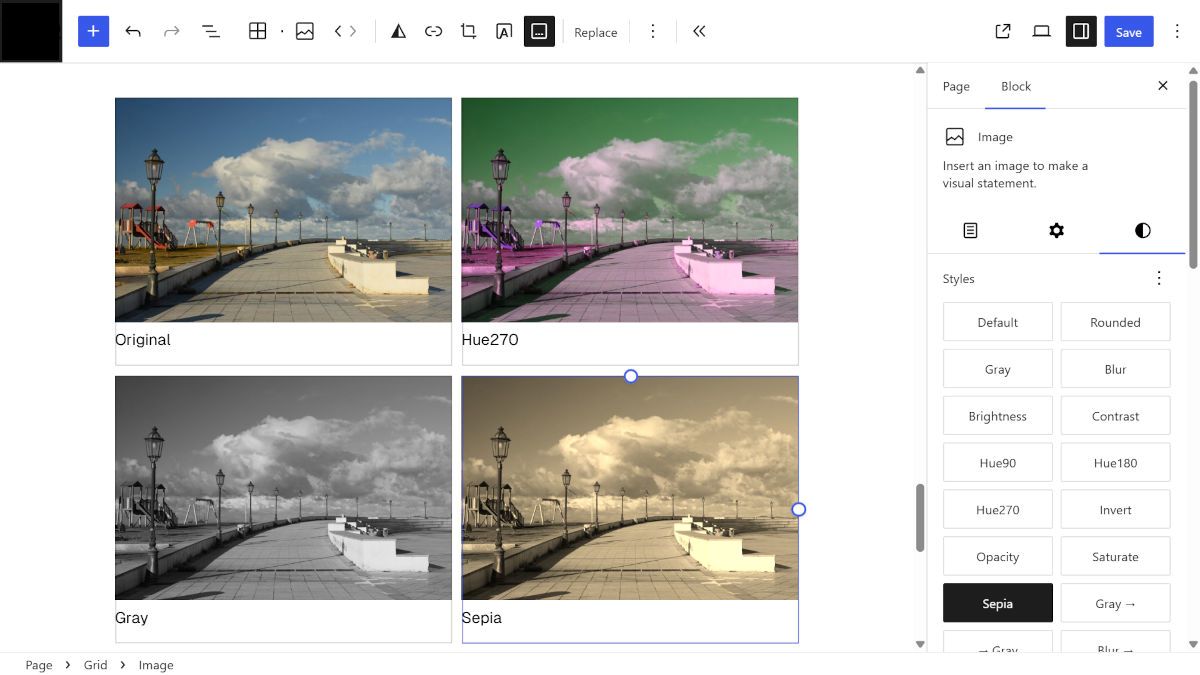
This simple plugin adds some image filters to the image block and featured image block. These are preset filters that add static color effects and hover color effects.
This plugin does not add new blocks to the editor but enriches the choice of filters available in the Styles section of the Image block and Featured image block of posts and pages.
Media Licenses
The original images used in this plugin’s banners, screenshots and icons were captured by the plugin author.
Tangkapan Layar


Instalasi
Option 1
- Log in to your WordPress admin panel.
- Go to Plugins > Add New and search for Masino1967 Image Filters Collection.
- Click Install Now, then Activate.
Option 2
- Download the plugin zip from WordPress.org.
- Go to Plugins > Add New > Upload Plugin.
- Upload the zip file and click Install Now.
- Click Activate Plugin.
Tanya Jawab
-
How do I apply filters to my images?
-
Select the image in edit mode. Open the “Style” section of the “Image” block or the “Featured Image” block on the right side of the edit screen, and click on the name of one of the available effects.
-
How do filters work?
-
There are three filter modes. The first: clicking on a filter’s name, such as Sepia, applies the filter to the image. The second: clicking on a filter’s name preceded by an arrow, such as -> Sepia, applies the filter only when the mouse is over the image. When the mouse leaves the image area, the filter is deactivated. The third: clicking on a filter name followed by an arrow, such as Sepia ->, applies the filter only when the mouse is not hovering over the image.
Ulasan


Kontributor & Pengembang
“Masino1967 Image Filters Collection” adalah perangkat lunak open source. Berikut ini mereka yang sudah berkontribusi pada plugin ini.
Kontributor
“Masino1967 Image Filters Collection” telah diterjemahkan dalam 5 bahasa. Terima kasih kepada para penerjemah untuk kontribusi-nya.
Terjemahkan “Masino1967 Image Filters Collection” dalam bahasa Anda.
Tertarik mengembangkan?
Lihat kode, periksa repositori SVN , atau mendaftar ke log pengembangan melalui RSS.
Log Perubahan
1.0.1
First stable release.