
Deskripsi
SendApp brings your WooCommerce store to WhatsApp. Click “Connect to SendApp”, log in to your SendApp account, pick your WhatsApp number and you are done: no API key to copy.
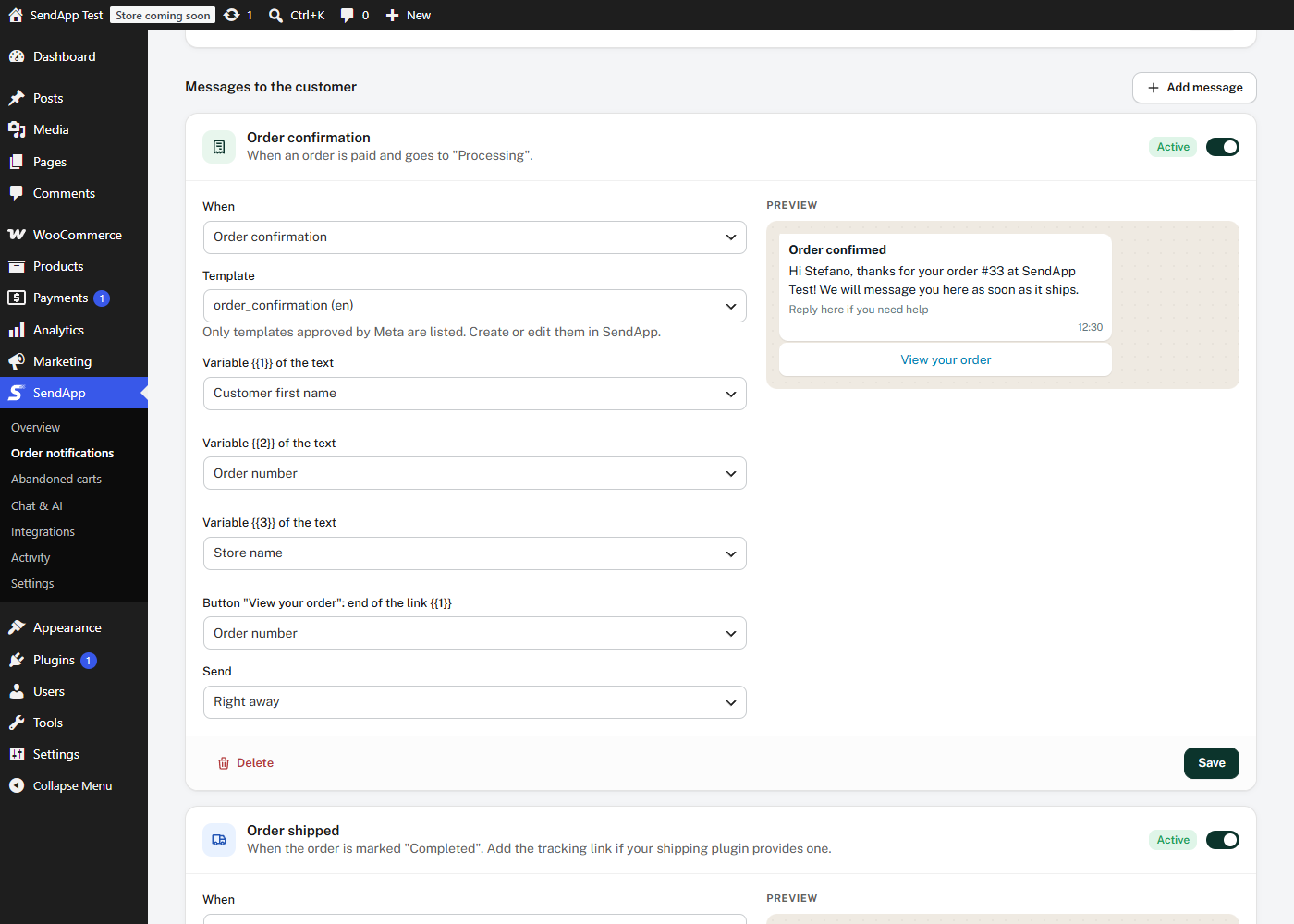
- Order notifications — order confirmation, shipping update with the tracking link, cancellation and any other status, sent with your WhatsApp templates approved by Meta. Choose the template and what fills each variable from a menu, and see a live WhatsApp preview.
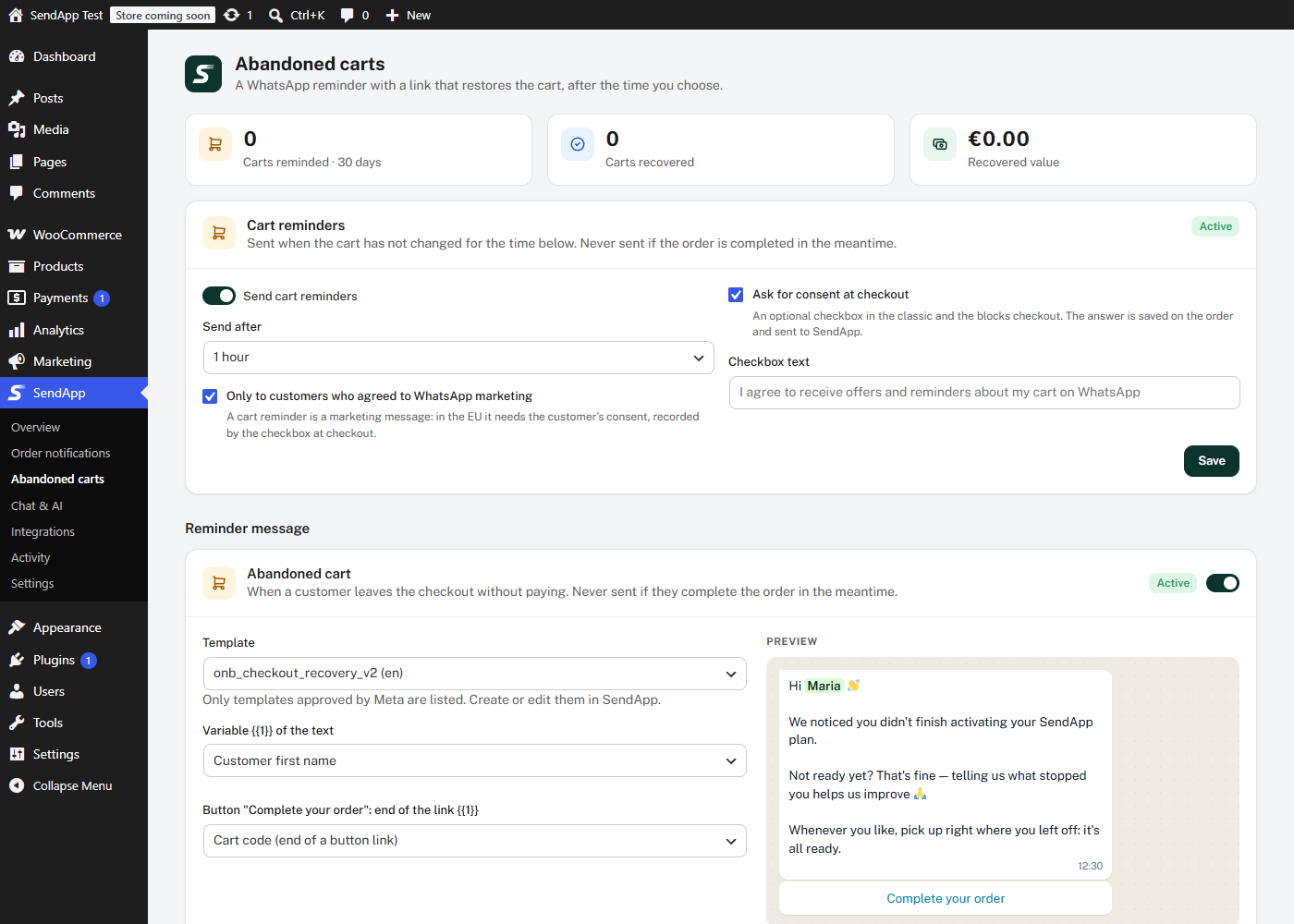
- Abandoned cart recovery — a WhatsApp reminder after the time you choose, with a link that restores the cart. By default only customers who ticked the marketing consent checkbox at checkout (classic and blocks checkout) are reminded.
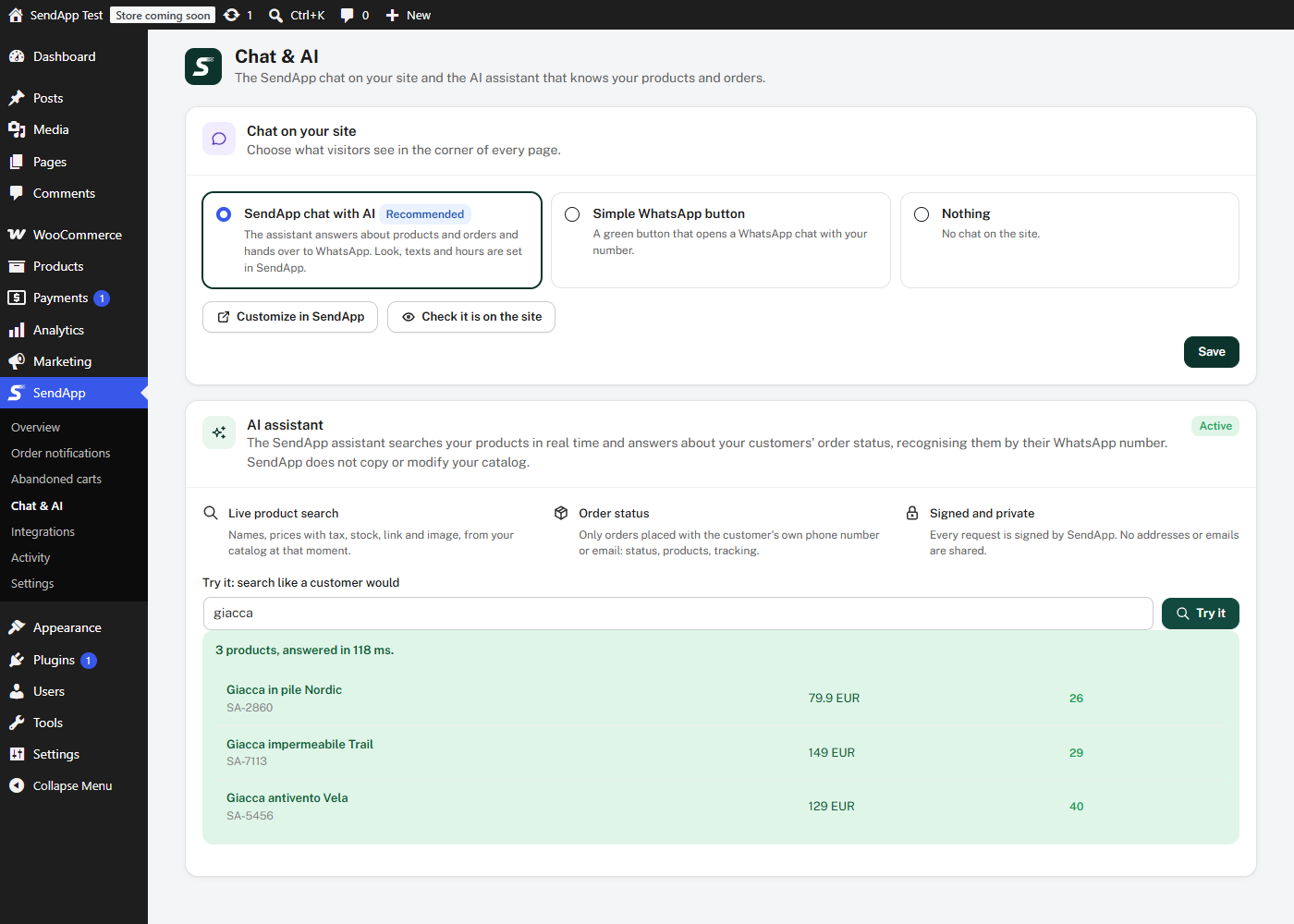
- AI assistant — the SendApp assistant searches your products in real time and answers about your customers’ order status, recognising them by their WhatsApp number. SendApp does not copy or modify your catalog: every answer is read from your store at that moment, through signed requests.
- Chat on your site — the SendApp chat widget (AI + WhatsApp) or a simple WhatsApp button.
- Shop notifications — get a WhatsApp on your own phone for new orders or anything else.
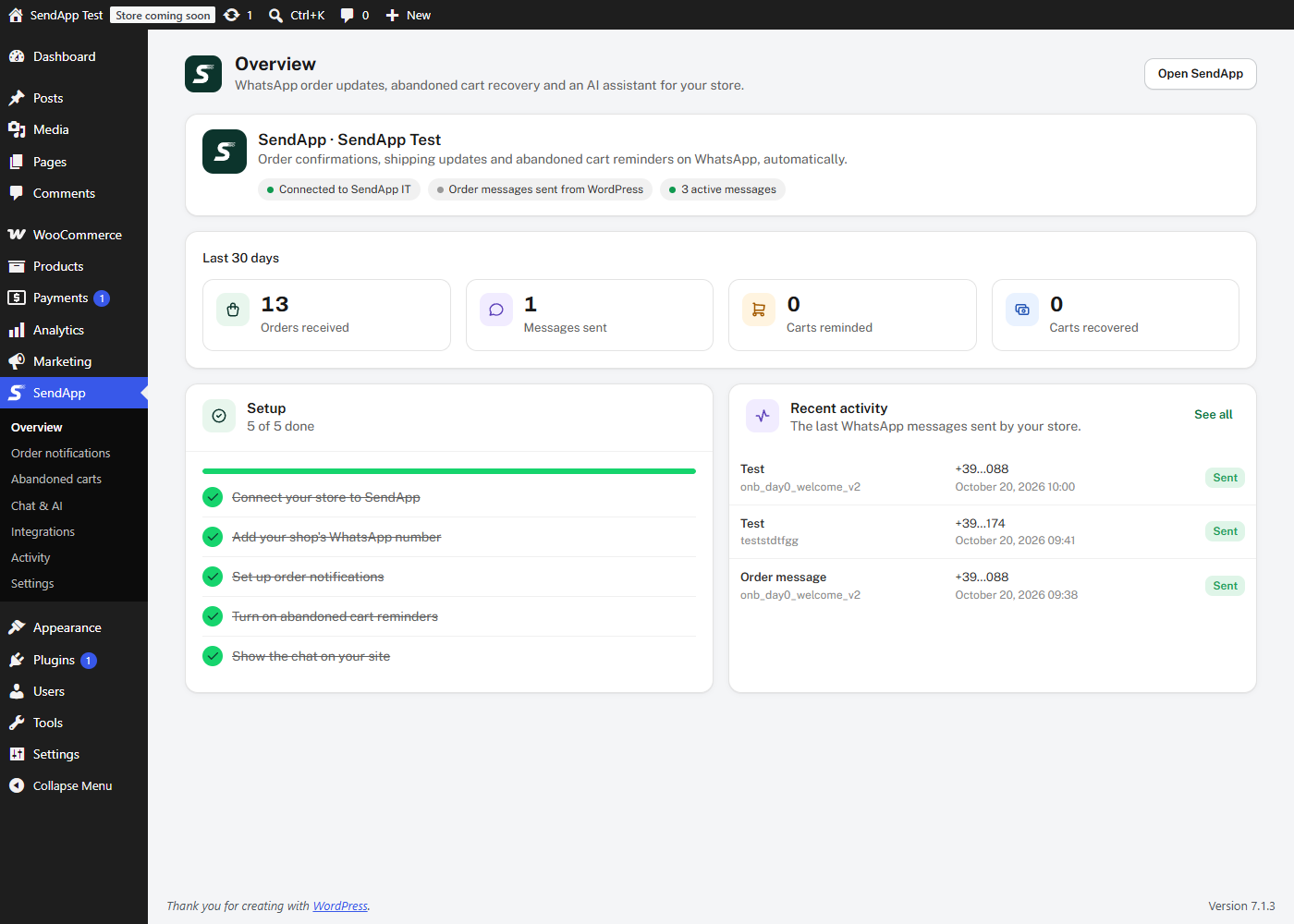
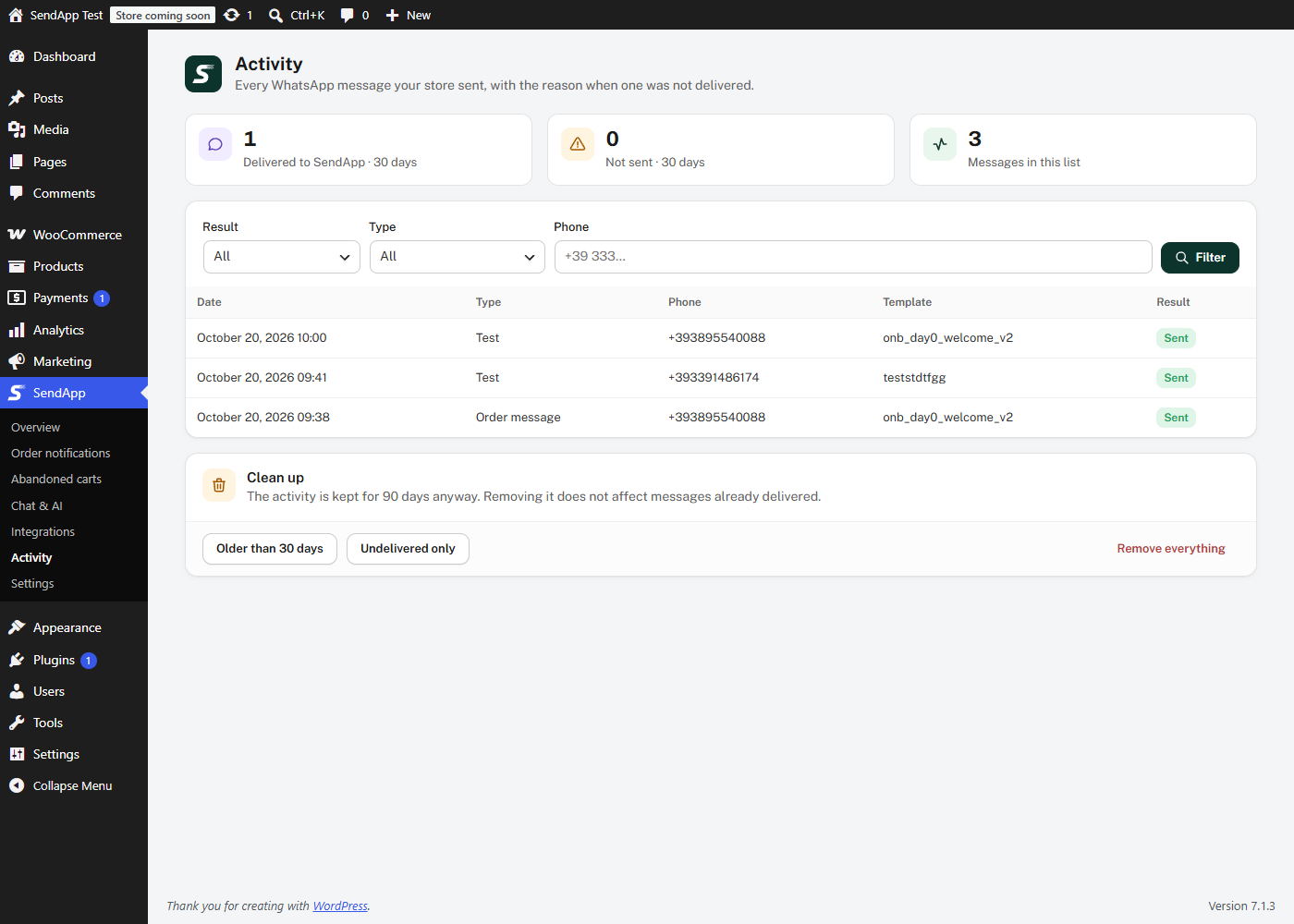
- Results — messages sent, carts reminded and recovered, and the recovered value over the last 30 days, plus a full activity log.
- Integrations — WhatsApp messages from WPForms and Elementor Pro forms, and from 25+ plugins: subscriptions, bookings, memberships, courses, marketplaces, shipping tracking (WooCommerce Shipment Tracking, AST, AfterShip and more).
Two ways to send:
- Manage from SendApp (recommended) — orders and abandoned carts are sent to your SendApp account through a signed webhook, and messages, templates and timing are set in SendApp Automations.
- Send from WordPress — the plugin sends the templates you configure on the Order notifications page.
Already a SendApp Official customer? You can keep using your SendApp Official (official.sendapp.cloud) API key: choose “Do you use SendApp Official? Connect with your API key” on the Overview page.
Built for performance and privacy: messages are sent in the background (Action Scheduler) and never slow down the checkout; HPOS and the blocks checkout are supported; connection keys are stored encrypted and never shown in pages or logs.
External services
This plugin connects to services provided by SendApp (EVERYSOFT SRLS). It sends data only after you connect your store, and only for the features you turn on.
SendApp (app.sendapp.ai) — the SendApp platform.
https://app.sendapp.ai/connect/store— opened in your browser when you click “Connect to SendApp”, with your site address, the return address in your admin and a one-time security code.https://app.sendapp.ai/api/store-connect/tokenandhttps://app.sendapp.ai/api/store-connect/disconnect— to complete the connection (exchange of a one-time code for the store keys) and to revoke the key when you disconnect or uninstall.https://app.sendapp.ai/api/whatsapp-meta/get_templatesandhttps://app.sendapp.ai/api/whatsapp-meta/send— to list your approved WhatsApp templates and to send a template message: the recipient’s phone number and the values of the template variables (for example customer name, order number, total, products, tracking link, cart recovery link).https://app.sendapp.ai/api/ecommerce/woocommerce/webhook/…— order data when an order is created, paid or completed (customer name, email, phone, address, products, totals, status, marketing consent), so SendApp can record the order, the contact and the revenue; with “Send from WordPress” these events are marked so that SendApp does not message the customer again. When SendApp manages the messages, also abandoned carts (customer name, email, phone, products, total, consent, recovery link).https://app.sendapp.ai/apps/widget/script/…— the SendApp chat widget script, loaded on your site’s pages only when you turn the widget on.- Incoming requests: SendApp calls
/wp-json/sendapp/v1/products/searchand/wp-json/sendapp/v1/orderson your site to answer customers. Every request is signed; product answers contain public catalog data, order answers only number, date, status, total, products, tracking and the customer’s own phone.
Terms: https://sendapp.live/en/terms/ — Privacy policy: https://sendapp.live/en/privacy/
SendApp Official (official.sendapp.cloud) — only if you connect with a SendApp Official API key: https://official.sendapp.cloud/api/verify, /api/templates and /api/send/template, with the recipient’s phone number and the template variable values. Same terms and privacy policy.
YouTube (youtube-nocookie.com) — the official setup video on the Overview page is loaded from https://www.youtube-nocookie.com/embed/… only when you press play; nothing is requested from YouTube before that. Google privacy policy: https://policies.google.com/privacy
WhatsApp (wa.me) — the simple WhatsApp button links to https://wa.me/<your number>; nothing is sent until a visitor clicks it. WhatsApp terms: https://www.whatsapp.com/legal/
Privacy
When connected, the plugin sends to SendApp the data listed under External services, to deliver WhatsApp messages about orders, abandoned cart reminders (only with consent by default) and the answers of the AI assistant. On your site it keeps a log of sent messages and the abandoned carts for up to 90 days. Both are included in WordPress’ personal data export and erasure tools (Tools Export / Erase Personal Data), and a suggested text is added to your privacy policy guide. Connection keys are stored encrypted with your site’s salts. Uninstalling the plugin revokes the key and deletes its data.
Tangkapan Layar
Instalasi
- Install and activate this plugin (WooCommerce is needed for the store features; forms and the other integrations work without it).
- Go to SendApp Overview and click Connect to SendApp. Log in (or create a free account) on app.sendapp.ai, choose your WhatsApp number and confirm: you come back to WordPress connected.
- In Order notifications choose who sends the messages and the template for each order event.
- In Abandoned carts turn on the reminders and the consent checkbox.
- In Chat & AI choose the chat shown on your site and try the AI search.
Your site must use https, and pretty permalinks must be enabled (Settings Permalinks, any option except “Plain”) for the AI assistant.
Tanya Jawab
-
How do I connect?
-
Go to SendApp Overview and click “Connect to SendApp”: you log in to app.sendapp.ai (or create an account), choose your WhatsApp number and come back connected. Watch the 1-minute video on the Overview page or read the step-by-step guide: https://app.sendapp.ai/docs/integrazioni/woocommerce?lang=en (also in Italian, Spanish, French, German and Portuguese).
-
Do I need a SendApp account?
-
Yes. You can create one for free during the connection.
-
Which SendApp plan do I need?
-
The connection and WhatsApp messages sent through the API work on the Professional, Business, Premium, Gold, Platinum and Team plans. Professional Plus is the only plan without API access. During the free trial, messages sent through the API are not delivered. The AI assistant that searches your products is available from the Business plan; the chat widget is included in every plan. See the plans at https://app.sendapp.ai/plans.
-
Which templates can I use?
-
The WhatsApp templates approved by Meta in your SendApp account. Create or edit them in SendApp; the plugin lists them and lets you choose what fills each variable.
-
Are abandoned cart reminders sent to everyone?
-
No. A cart reminder is a marketing message: by default it goes only to customers who gave their consent with the checkbox at checkout. You can change this in Abandoned carts. A reminder is never sent if the order is completed in the meantime.
-
Does SendApp copy my products?
-
No. The assistant asks your store for products and order status when a customer writes, through two REST routes that only answer requests signed by SendApp. Orders are only returned to the customer whose phone number or email placed them, and without addresses or emails.
-
Is my store slowed down?
-
No. Messages and webhooks are sent in the background with Action Scheduler, never during the checkout. Product search answers in a few hundred milliseconds even on catalogs of 30,000 products.
-
What happens if I disconnect?
-
The key is revoked on SendApp and removed from your site; messages and the assistant stop until you connect again. Your settings and messages are kept.
-
I’m updating from version 2.x. What changes?
-
Your settings, triggers and notifications are kept. If you used a SendApp Official API key it keeps working without any action. If you used an app.sendapp.ai (SendApp Agent) key, you will be asked to reconnect with one click from SendApp Overview: the API key fields are replaced by “Connect to SendApp”.
Ulasan
Belum ada ulasan untuk plugin ini.
Kontributor & Pengembang
“SendApp – Message Notifications for WooCommerce & more” adalah perangkat lunak open source. Berikut ini mereka yang sudah berkontribusi pada plugin ini.
Kontributor
Terjemahkan “SendApp – Message Notifications for WooCommerce & more” dalam bahasa Anda.
Tertarik mengembangkan?
Lihat kode, periksa repositori SVN , atau mendaftar ke log pengembangan melalui RSS.
Log Perubahan
3.0.1
- Changed: “Disconnect” and uninstall send the key in the request body, as the SendApp store-connect contract defines.
- Improved: the SendApp answer to a disconnect is written to the debug log (status and message only, never the key).
- New: Brazilian Portuguese translation.
- New: official setup video (loaded only on click, privacy-enhanced mode) and step-by-step guide on the Overview page, in the admin’s language.
- New: plan notes for the AI assistant, the chat widget and the free trial.
3.0.0
- New: “Connect to SendApp” — one-click connection to app.sendapp.ai (OAuth with PKCE), no API key to copy; keys stored encrypted. SendApp Official API keys still supported.
- New: completely redesigned admin — Overview, Order notifications, Abandoned carts, Chat & AI, Integrations, Activity, Settings — with a live WhatsApp preview and variables chosen from a menu.
- New: AI assistant support — signed REST routes for live product search and order status; the catalog is never copied.
- New: orders and abandoned carts sent to SendApp through a signed webhook (“Manage from SendApp”), or sent from WordPress as before.
- New: abandoned carts with recovery link, marketing consent checkbox (classic and blocks checkout), consent-only reminders, configurable delay and recovered-sales statistics.
- New: SendApp chat widget toggle with “seen on the site” check.
- New: privacy exporter and eraser; uninstall revokes the key.
- Improved: every send runs in the background (Action Scheduler); all active messages for a status are sent; “Enable notifications” is respected.
- Improved: HPOS and blocks checkout compatibility; phone numbers completed with the customer’s country code.
- Fixed: API keys and phone numbers no longer written to logs; MySQL 8 database upgrade; abandoned cart messages filled with the cart data; carousel templates; duplicate chat widget; country codes list.
2.2.2
- A successful save now clears the “entry was not saved” warning, which could otherwise still be shown after an earlier failed attempt had been corrected.
2.2.1
- Removed dead code from the admin script that raised “$(…).tooltip is not a function” on every SendApp admin page. It initialised a colour picker, a business-hours toggle and jQuery UI tooltips for elements the plugin no longer has, and jQuery UI Tooltip is not loaded.
- The admin script now declares jQuery as a dependency, so the per-page scripts attached to it can never be printed before jQuery is available.
2.2.0
- Adding a trigger or a notification no longer fails silently when the WhatsApp templates cannot be loaded. The editor used to redirect back and throw the submission away without a word, so an expired API key looked exactly like the Save button doing nothing; the plugin now states that the entry was not saved and shows the reason returned by the API.
- The API notice reports the actual error, so an expired or revoked key is no longer indistinguishable from a key that was never entered.
2.1.9
- Fixed the template preview when the header is an image or a video: the media was rendered at its natural size, so it spilled out of the chat bubble and the message text was drawn on top of it.
2.1.8
- Shipment tracking now recognises AfterShip and Woo Orders Tracking as well, on top of WooCommerce Shipment Tracking, Advanced Shipment Tracking and TrackShip.
- The list of tracking meta keys is filterable, so support for any other shipping plugin can be added without editing the plugin: see the sapp_tracking_meta_keys and sapp_tracking_meta_lists filters.
2.1.7
- Event triggers now show the same live WhatsApp preview as triggers and notifications: pick a template and the phone on the right renders it, variables highlighted.
- The preview redraws while the header media URL is typed.
- The phone preview now lives in one shared file instead of being copied into each editor, so a fix reaches every screen at once.
- A template with no displayable content now says so, instead of drawing an empty bubble with only a timestamp.
2.1.6
- Shipment tracking notifications now work on shops using HPOS. The tracking watcher listened on post meta, which stops firing once orders move to custom tables, so no tracking message was ever sent on those shops; it now listens on the order save itself.
- Tracking changes made after the first one are notified too. Previously only the very first shipment of an order triggered a message.
- Added a generic tracking watcher that picks up the common tracking meta keys, so shipping plugins without their own hooks are covered.
- Added a public action for developers and shipping plugins: do_action( ‘sapp_tracking_event’, $order_id, array( ‘tracking_number’ => ‘…’, ‘carrier’ => ‘…’, ‘tracking_url’ => ‘…’ ) ).
- The same shipment can no longer produce more than one message when several sources report it.
2.1.5
- Fixed abandoned cart notifications, which never reached customers. The check runs inside Action Scheduler, where WooCommerce does not start a session, so the handler aborted immediately; it now reads the session straight from the database. The customer phone is also read correctly: WooCommerce serialises each session value on its own and stores the number under ‘phone’, not ‘billing_phone’.
- Abandoned cart checks now log why nothing was sent (no cart, no phone, no trigger, no template), so a silent failure can be diagnosed.
2.1.4
- Fixed the Amelia integration: booking hooks are now registered with the argument counts Amelia actually passes (a mismatch could raise a fatal error while a booking was being created), approved and cancelled bookings are detected correctly, and the service name is read from the appointment service data.
2.1.3
- Updated the plugin display name to comply with the WordPress.org plugin directory naming guidelines. No functional change.
2.1.2
- Updated the plugin display name for clarity. No functional change.
2.1.1
- Naming: switched the code prefix from
sendapp_to the more distinctsapp_/SAPP_/Sapp_for all functions, classes, constants, options, transients, nonce actions, AJAX actions, script/style handles and menu slugs, to avoid any collision with the common word “send”. No user-facing change. - Fixed a slow external URL in the “External services” section.
2.1.0
- Naming: all internal identifiers (functions, classes, constants, option keys, transients, nonce actions, AJAX actions, script/style handles) unified under the single
sendapp_/SENDAPP_/SendApp_prefix, replacing the previous mix ofsendappwc_,SENDAPP_WC_andSendAppWC_. Existing settings are migrated automatically on upgrade. - WooCommerce is no longer a hard requirement: the
Requires Plugins: woocommerceheader was removed, since Forms, Events and the chat widget work without WooCommerce.
2.0.3
- Compliance: removed all heredoc and nowdoc syntax flagged by Plugin Check — the inline admin JavaScript blocks passed to
sendappwc_inline_js()are now standard quoted strings with identical runtime output. No functional change.
2.0.2
- Security & WordPress.org guidelines: nonces wrapped in
sanitize_text_field(wp_unslash(...)); all$_POST['variable_mapping']arrays sanitized deeply before JSON-encoding; test-send JSON values sanitized after decode. - Compliance: replaced every inline
<style>/<script>block in admin pages withwp_add_inline_style()/wp_add_inline_script()via centralized handles. Agent widget snippet now loaded throughwp_enqueue_script()instead of an echoed<script src>tag. - Cleanup: removed redundant
file_put_contentsdebug log in plugin folder (relies onWP_DEBUG_LOG); removedload_plugin_textdomain(WordPress 4.6+ auto-loads .org translations); moved admin menu position from 25 to 58 to avoid conflict with core Comments slot; ABSPATH guard added to admin-dashboard-page.php;the_contentfilter nowesc_attr()-escapes the WhatsApp wa.me URL message; updated Privacy / Terms URLs in readme.txt.
2.0.1
- New integration: Salon Booking System (free) — booking created / confirmed / paid / cancelled events with customer name, phone, email, service(s) and start/end context.
2.0.0
- Major: generic event-driven architecture (
wp_sendapp_event_triggerstable + dispatcher + registry). - 24+ new integrations (Tier 1-4): WC Subscriptions, Contact Form 7, Gravity Forms, Fluent Forms, Forminator, LearnDash, LifterLMS, Tutor LMS, MemberPress, PMPro, EDD, WP Job Manager, Dokan, WCFM, FluentCRM, Groundhogg, BuddyPress, bbPress, The Events Calendar, WC Bookings, Amelia, Bookly, Booknetic, WC Shipment Tracking, Advanced Shipment Tracking, ACF (context extender).
- New admin page SendApp Events with auto-discovered event types and
ctx:<key>mapping.
1.5.0
- New form integrations: WPForms (free + Pro) and Elementor Pro Forms with field-to-variable mapping. New
wp_sendapp_form_triggerstable and SendApp Forms admin.
1.4.3
- Widget mode switch in Settings Widget Chat: built-in floating button OR SendApp Agent snippet (XSS-safe URL extraction).
1.4.2
- Test card now surfaces the real Meta API error message (HTTP code + decoded message) instead of “check the log”.
- FLOW button support: auto-generated
flow_tokenfor templates with WhatsApp Flow buttons.
1.4.1
- Test card dynamic form for media URL, body / header / button URL variables and carousel cards.
1.4.0
- New SendApp Send Log admin page with structured logging of every send attempt.
1.3.x
- SendApp Agent provider support (api/whatsapp-meta endpoints) with provider-aware verify / templates / send.
1.2.x
- Send delay (X days after order status) for both Triggers and Notifications via Action Scheduler.
1.1.x
- Abandoned cart trigger.
- Carousel template support, button URL variable mapping, header media URL injection.
1.0.0
- Initial release: WooCommerce Triggers + Notifications, settings + chat widget, 6 locales.