

Deskripsi
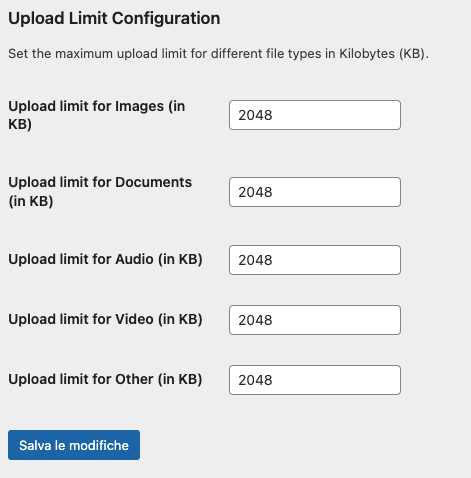
The File Upload Limiter plugin allows you to set specific upload size limits for different types of files in the WordPress backend. This ensures that users cannot upload files that exceed the defined limits, helping to manage server resources effectively.
Features:
* Set upload limits for images, documents, audio, video, and other file types.
* Define limits in kilobytes (KB).
* Easy-to-use settings page in the WordPress admin area.
License
This plugin is licensed under the GPL-2.0 or later. For more information, see the LICENSE.txt file included with this plugin.
Arbitrary section
You can use this section to provide any additional information you feel is relevant for users of your plugin.
Tangkapan Layar
Instalasi
- Upload the
file-upload-limiterfolder to the/wp-content/plugins/directory. - Activate the plugin through the ‘Plugins’ menu in WordPress.
- Go to ‘Settings’ > ‘File Upload Limiter’ to configure the upload limits.
Tanya Jawab
-
Can I set different limits for different file types?
-
Yes, you can set individual upload limits for images, documents, audio, video, and other file types from the plugin’s settings page.
-
What happens if a user tries to upload a file that exceeds the limit?
-
The user will receive an error message indicating that the file is too large and specifying the allowed limit for that file type.
Ulasan
Belum ada ulasan untuk plugin ini.
Kontributor & Pengembang
“File Upload Limiter” adalah perangkat lunak open source. Berikut ini mereka yang sudah berkontribusi pada plugin ini.
Kontributor
Terjemahkan “File Upload Limiter” dalam bahasa Anda.
Tertarik mengembangkan?
Lihat kode, periksa repositori SVN , atau mendaftar ke log pengembangan melalui RSS.
Log Perubahan
1.0
- Initial release.