
Deskripsi
Magni Image Flip adds a flip effect on your woocommerce product thumbnail images. It takes the first image from the gallery and uses it as a second image for the product.
The plugin allows you to have different types of animations for image hover effect. It will allow you to customize the plugin to as per your needs.
Just make sure add a second image to your WooCommerce Gallery and it will automatically display the image on your site.
Check plugin in action
Tangkapan Layar
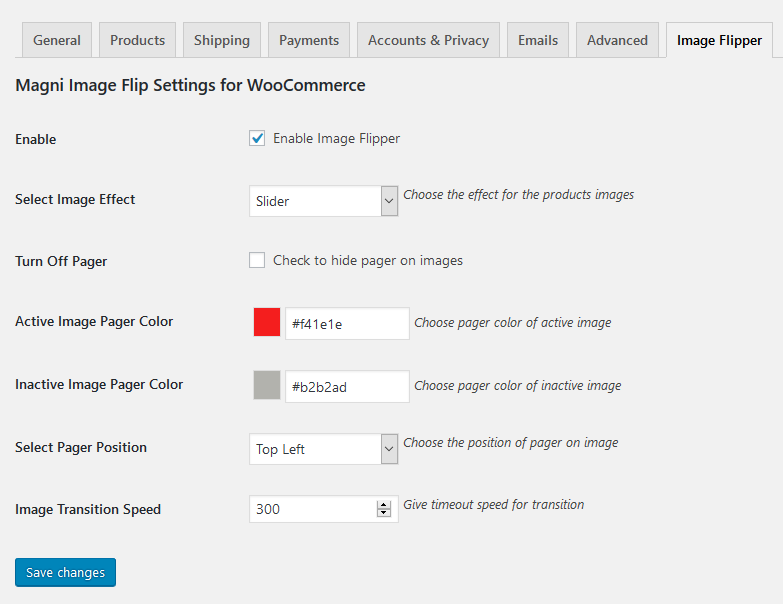
Admin settings. 
Frontend View.
Instalasi
- Upload “magni-image-flip.zip” file to your “/wp-content/plugins/” directory.
- Once uploaded go to your WordPress admin and navigate to plugins.
- Once you are on plugins screen then you can see Magni Image Flip For WooCommerce listed there.
- Just activate and start playing with the plugin configurations.
Tanya Jawab
-
Why should I use this plugin?
-
This plugin would help you to engage more customers by creating nice looking image flip effect.
Ulasan


Kontributor & Pengembang
“Magni Image Flip For WooCommerce” adalah perangkat lunak open source. Berikut ini mereka yang sudah berkontribusi pada plugin ini.
Kontributor


Terjemahkan “Magni Image Flip For WooCommerce” dalam bahasa Anda.
Tertarik mengembangkan?
Lihat kode, periksa repositori SVN , atau mendaftar ke log pengembangan melalui RSS.
Log Perubahan
1.2
- Fixed: Deprecated issue resolved on 1.1 version.
1.1
- Added: bottom left and bottom right Pager position.
- Added: Correct .pot file added.
1.0
- Initial release.